
Lexus RX (RX 350L, RX450h) 2016-2026 Repair Manual: Customize Parameters
CUSTOMIZE PARAMETERS
CUSTOMIZING WITH REMOTE TOUCH (REMOTE OPERATION CONTROLLER ASSEMBLY)
(a) Customizing with the touch function cancellation function.
NOTICE:
Confirm the touchpad surface is free of foreign matter before customizing.
(1) Turn the engine switch on (ACC).
(2) Simultaneously press and hold the "MAP" switch and back switch for 5 seconds or more.
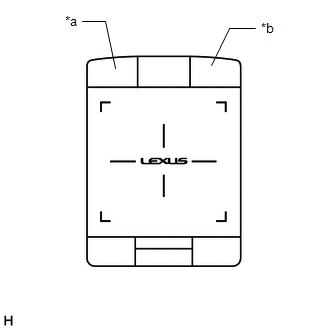
| *a | "MAP" Switch |
| *b | Back Switch |
(3) While pressing and holding the "MAP" switch and back switch, tap the touchpad with 2 fingers.
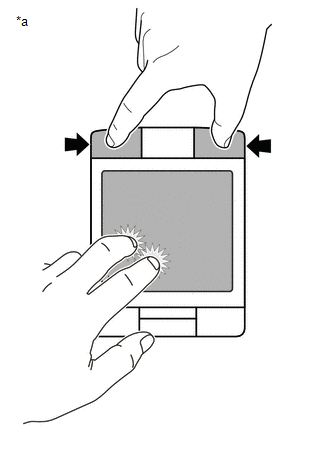
| *a | Example |
HINT:
- If any switch other than the "MAP" switch or back switch is pressed, the customize setting cannot be changed.
- Do not pinch in/out or slide fingers when tapping the touchpad with 2 fingers.
(4) Confirm that the answer-back function vibrates the touchpad a specified number of times to indicate that the setting has changed.
Setting| Touch Function Cancellation Function | Number of Answer Back Vibrations |
|---|---|
| Off (Default) | 1 |
| On | 2 |
(5) Repeat step (3) until the desired setting is selected.
HINT:
The touch function cancellation function alternates between on and off.
(6) Release the "MAP" switch and back switch to select the set value.
 How To Proceed With Troubleshooting
CAUTION / NOTICE / HINT HINT:
Use the following procedure to troubleshoot the navigation system.
*: Use the Techstream.
PROCEDURE 1. VEHICLE BROUGHT TO WORKSHOP
NEXT ...
 System Description
SYSTEM DESCRIPTION NAVIGATION SYSTEM OUTLINE (a) Vehicle position tracking methods It is essential that the navigation system correctly tracks the current vehicle position and displays it on the map. ...
Other materials:
Lexus RX (RX 350L, RX450h) 2016-2026 Repair Manual > Steering Gear: Inspection
INSPECTION PROCEDURE 1. INSPECT TIE ROD ASSEMBLY LH (a) Secure the tie rod assembly LH in a vise between aluminum plates. NOTICE: Do not overtighten the vise. (b) Install the nut to the stud bolt. (c) Flip the ball joint back and forth 5 times. (d) Using a torque wrench and the nut, t ...
Lexus RX (RX 350L, RX450h) 2016-2026 Repair Manual > Millimeter Wave Radar Sensor: Components
COMPONENTS ILLUSTRATION *1 COOL AIR INTAKE DUCT SEAL *2 MILLIMETER WAVE RADAR SENSOR ASSEMBLY N*m (kgf*cm, ft.*lbf): Specified torque - - ...
Lexus RX (RX 350L, RX450h) 2016-{YEAR} Owners Manual
- For your information
- Pictorial index
- For safety and security
- Instrument cluster
- Operation of each component
- Driving
- Lexus Display Audio system
- Interior features
- Maintenance and care
- When trouble arises
- Vehicle specifications
- For owners
Lexus RX (RX 350L, RX450h) 2016-{YEAR} Repair Manual

0.0132