
Lexus RX (RX 350L, RX450h) 2016-2026 Repair Manual: Tilt And Telescopic Manual Switch
Inspection
INSPECTION
PROCEDURE
1. INSPECT TILT AND TELESCOPIC SWITCH
| (a) Remove the tilt and telescopic switch. Click here |
|
.gif)
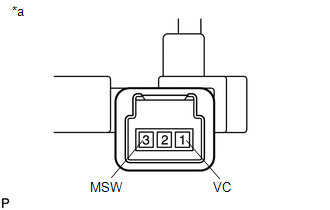
(b) Measure the resistance according to the value(s) in the table below.
Standard Resistance:
| Tester Connection | Condition | Specified Condition |
|---|---|---|
| 1 (VC) - 3 (MSW) | Tilt up | 342 to 378 Ω |
| Tilt down | 1890.5 to 2089.5 Ω | |
| Telescopic contract | 750.5 to 829.5 Ω | |
| Telescopic extend | 152 to 168 Ω |
Installation
INSTALLATION
PROCEDURE
1. INSTALL TILT AND TELESCOPIC SWITCH
(a) Engage the claw to install the tilt and telescopic switch.
(b) Connect the tilt and telescopic connector to the tilt and telescopic switch.
2. INSTALL LOWER STEERING COLUMN COVER
Click here .gif)
3. CUSTOMIZE POWER TILT AND POWER TELESCOPIC STEERING COLUMN SYSTEM
Click here
Removal
REMOVAL
PROCEDURE
1. CHANGE POWER TILT AND POWER TELESCOPIC STEERING COLUMN SYSTEM SETTINGS
Click here .gif)
2. REMOVE LOWER STEERING COLUMN COVER
Click here
3. REMOVE TILT AND TELESCOPIC SWITCH
| (a) Disconnect the tilt and telescopic connector from the tilt and telescopic switch. |
|
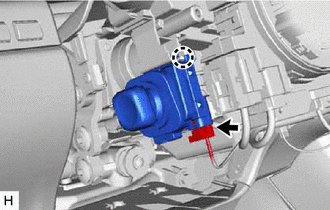
(b) Disengage the claw and pull out the tilt and telescopic switch.
 Removal
REMOVAL CAUTION / NOTICE / HINT The necessary procedures (adjustment, calibration, initialization, or registration) that must be performed after parts are removed, installed, or replaced during the st ...

Other materials:
Lexus RX (RX 350L, RX450h) 2016-2026 Repair Manual > Can Communication System: Check Bus 4 Lines for Short Circuit
DESCRIPTION There may be a short circuit between the bus 4 main lines and/or bus 4 branch lines when the resistance between terminals 22 (CA2H) and 7 (CA2L) of the network gateway ECU is below 54 Ω. Symptom Trouble Area Resistance between terminals 22 (CA2H) and 7 (CA2L) of network gateway ...
Lexus RX (RX 350L, RX450h) 2016-2026 Repair Manual > Smart Access System With Push-button Start (for Entry Function): Back Door Entry Unlock Function does not Operate
DESCRIPTION If the entry unlock function does not operate for the back door only, but the entry lock function operates, the request code is being transmitted properly from the back door. In this case, there may be a problem related to the open switch (connection between the back door opener switch a ...
Lexus RX (RX 350L, RX450h) 2016-{YEAR} Owners Manual
- For your information
- Pictorial index
- For safety and security
- Instrument cluster
- Operation of each component
- Driving
- Lexus Display Audio system
- Interior features
- Maintenance and care
- When trouble arises
- Vehicle specifications
- For owners
Lexus RX (RX 350L, RX450h) 2016-{YEAR} Repair Manual

0.0113