
Lexus RX (RX 350L, RX450h) 2016-2026 Repair Manual: Customize Parameters
CUSTOMIZE PARAMETERS
CUSTOMIZING WITH REMOTE TOUCH
(a) Customizing with the touch function cancellation function.
NOTICE:
Confirm the touchpad surface is free of foreign matter before customizing.
(1) Turn the engine switch on (ACC).
(2) Simultaneously press and hold the "HOME" switch and back switch for 5 seconds or more.
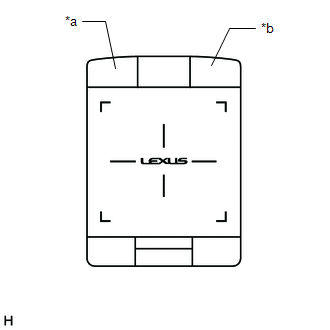
| *a | "HOME" Switch |
| *b | Back Switch |
(3) While pressing and holding the "HOME" switch and back switch, tap the touchpad with 2 fingers.
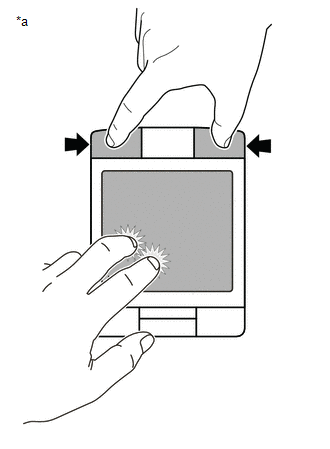
| *a | Example |
HINT:
- If any switch other than the "HOME" switch or back switch is pressed, the customize setting cannot be changed.
- Do not pinch in/out or slide fingers when tapping the touchpad with 2 fingers.
(4) Confirm that the answer-back function vibrates the touchpad a specified number of times to indicate that the setting has changed.
Setting| Touch Function Cancellation Function | Number of Answer Back Vibrations |
|---|---|
| Off (Default) | 1 |
| On | 2 |
(5) Repeat step (3) until the desired setting is selected.
HINT:
The touch function cancellation function alternates between on and off.
(6) Release the "HOME" switch and back switch to select the set value.
 How To Proceed With Troubleshooting
CAUTION / NOTICE / HINT HINT:
Use the following procedure to troubleshoot the audio and visual system.
*: Use the Techstream.
PROCEDURE 1. VEHICLE BROUGHT TO WORKSHOP
NEXT ...
 Problem Symptoms Table
PROBLEM SYMPTOMS TABLE NOTICE:
Depending on the parts that are replaced during vehicle inspection or maintenance, performing initialization, registration or calibration may be needed. Refer to Prec ...
Other materials:
Lexus RX (RX 350L, RX450h) 2016-2026 Repair Manual > Panoramic Moon Roof System: Operation Check
OPERATION CHECK CHECK AUTO OPERATION FUNCTION (FOR SLIDING ROOF) NOTICE:
Make sure that initialization has been completed before performing this inspection.
Click here
The sliding roof auto operation function can be customized. Make sure that the auto operation function is ON.
Click here ...
Lexus RX (RX 350L, RX450h) 2016-2026 Repair Manual > Automatic Transaxle System: Dtc Check / Clear
DTC CHECK / CLEAR NOTICE: When the diagnosis system is changed from normal mode to check mode or vice versa, all DTCs and freeze frame data recorded in normal mode are cleared. Before changing modes, always check and make a note of DTCs and freeze frame data. HINT:
DTCs which are stored in the EC ...
Lexus RX (RX 350L, RX450h) 2016-{YEAR} Owners Manual
- For your information
- Pictorial index
- For safety and security
- Instrument cluster
- Operation of each component
- Driving
- Lexus Display Audio system
- Interior features
- Maintenance and care
- When trouble arises
- Vehicle specifications
- For owners
Lexus RX (RX 350L, RX450h) 2016-{YEAR} Repair Manual

0.0121