
Lexus RX (RX 350L, RX450h) 2016-2026 Repair Manual: Operation Check
OPERATION CHECK
1. CHECK FOLD FUNCTION OPERATION
(a) Operating Conditions.
(1) All of the following conditions are met:
- Initialization (initial position memorization) has been completed.
- The back door is open. (When using the No. 1 fold seat switch assembly.)
- No rear No. 2 power seat fold or return switches are being operated.
-
The vehicle is stopped.
-
When any of the following conditions are met, the vehicle will be judged as stopped:
- The engine switch is off.
- The vehicle speed is below 5 km/h (3.1 mph) and the shift lever is in P.
- The vehicle speed is below 5 km/h (3.1 mph) and the brake pedal is depressed.
- The vehicle speed is below 5 km/h (3.1 mph) and the parking brake is applied.
-
When any of the following conditions are met, the vehicle will be judged as stopped:
(b) Check operation of fold function
HINT:
- The movement of the rear No. 2 power seat will vary depending on its position.
-
If any of the following conditions are met while a fold operation is being performed, the operation will stop and a buzzer will sound until any rear No. 2 power seat switch is operated.
- The fold switch is released during a fold operation.
- A rear No. 2 power seat switch other than the fold switch is operated.
- An obstruction is detected.
- The back door is closed. (When using the No. 1 fold seat switch assembly.)
-
The vehicle is judged as being driven.
- When the engine switch is on (IG) and any of the following conditions are met, the vehicle will be judged as being driven:
- (1) The vehicle speed is 5 km/h (3.1 mph) or more.
- (2) The shift lever is in any position other than P, the brake pedal is not depressed and the parking brake is released.
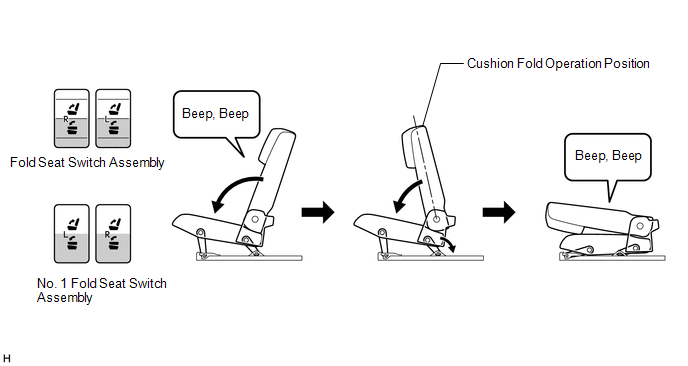
(1) Push and hold the fold switch and check that a buzzer sounds twice and the seatback begins operating in the fold direction.
HINT:
If the switch is pushed when the operating conditions are not met, the buzzer will sound once.
(2) When the seatback reaches the cushion fold operation position the seat cushion begins operating in the fold direction.
Check that when the rear No. 2 power seat fold operation is complete, the buzzer sounds twice.
2. CHECK RETURN FUNCTION OPERATION
(a) Operating Conditions.
(1) All of the following conditions are met:
- Initialization (initial position memorization) has been completed.
- The back door is open. (When using the No. 1 fold seat switch assembly.)
- No rear No. 2 power seat fold or return switches are being operated.
-
The vehicle is stopped.
-
When any of the following conditions are met, the vehicle will be judged as stopped:
- The engine switch is off.
- The vehicle speed is below 5 km/h (3.1 mph) and the shift lever is in P.
- The vehicle speed is below 5 km/h (3.1 mph) and the brake pedal is depressed.
- The vehicle speed is below 5 km/h (3.1 mph) and the parking brake is applied.
-
When any of the following conditions are met, the vehicle will be judged as stopped:
(b) Check operation of fold function
HINT:
- The movement of the rear No. 2 power seat will vary depending on its position.
-
If any of the following conditions are met while a return operation is being performed, the operation will stop and a buzzer will sound until any rear No. 2 power seat switch is operated.
- The fold switch is released during a return operation.
- A rear No. 2 power seat switch other than the return switch is operated.
- An obstruction is detected.
- The back door is closed. (When using the No. 1 fold seat switch assembly.)
-
The vehicle is judged as being driven.
- When the engine switch is on (IG) and any of the following conditions are met, the vehicle will be judged as being driven:
- (1) The vehicle speed is 5 km/h (3.1 mph) or more.
- (2) The shift lever is in any position other than P, the brake pedal is not depressed and the parking brake is released.
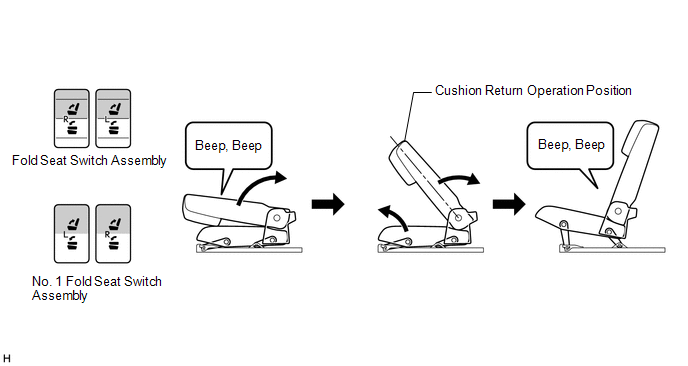
(1) Push and hold the return switch and check that a buzzer sounds twice and the seatback begins operating in the return direction.
HINT:
If the switch is pushed when the operating conditions are not met, the buzzer will sound once.
(2) Check that when the seatback reaches the cushion return operation position the seat cushion begins operating in the return direction.
Check that when the rear No. 2 power seat return operation is complete, the buzzer sounds twice.
CHECK JAM PROTECTION FUNCTION
HINT:
Do not allow any part of your body, such as you hand, to get caught while performing this inspection.
(a) Check fold operation jam protection function (operation stop)
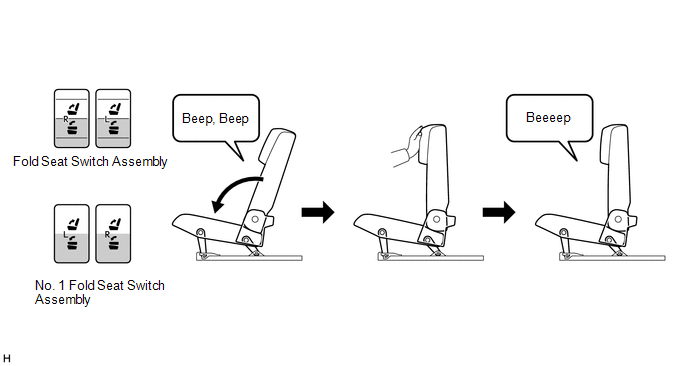
(1) Push and hold the fold switch to start the fold operation.
(2) Immediately after the fold operation begins, push the shoulder area of the seatback and check that the fold operation stops and a buzzer sounds.
HINT:
If the switch is pushed again, the operation will continue and the buzzer will stop.
(b) Check fold operation jam protection function (operation reverse)
HINT:
- If a return switch or fold switch is operated while the rear No. 2 power seat is operating in the reverse direction, the operation will stop.
- If an obstruction is detected while the rear No. 2 power seat is operating in the reverse direction, the operation will stop.
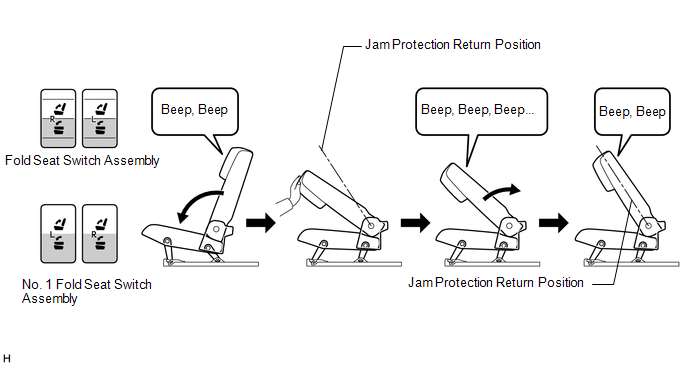
(1) Push and hold the fold switch to start the fold operation.
(2) After the seatback passes the jam protection return position, push the shoulder area of the seatback and check that a buzzer sounds intermittently while the seatback operates in the reverse direction until the seatback reaches the jam protection return position.
Check that when the seatback stops operating in the reverse direction, the buzzer sounds.
HINT:
If the switch is pushed again, the operation will continue and the buzzer will stop.
(c) Check return operation jam protection function
HINT:
- If a return switch or fold switch is operated while the rear No. 2 power seat is operating in the reverse direction, the operation will stop.
- If an obstruction is detected while the rear No. 2 power seat is operating in the reverse direction, the operation will stop.
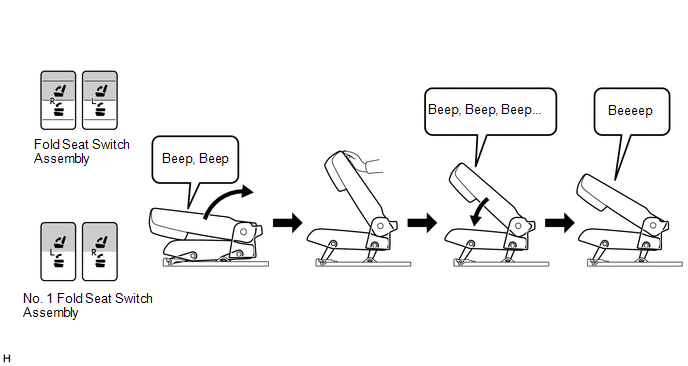
(1) Push and hold the return switch to start the return operation.
(2) While the return operation is being performed, push the back of the seatback and check that a buzzer sounds continuously while the seatback operates in the reverse direction. Check that when the seatback stops operating in the reverse direction, the buzzer sounds.
HINT:
- If the switch is pushed again, the operation will continue and the buzzer will stop.
- Depending on the position of the seatback after operating in the reverse direction, the buzzer may not sound.
 How To Proceed With Troubleshooting
PROCEDURE 1. VEHICLE BROUGHT TO WORKSHOP
NEXT 2. CUSTOMER PROBLEM ANALYSIS HINT:
In troubleshooting, confirm that the problem symptoms have been accurately identi ...
 Initialization
INITIALIZATION 1. INITIALIZATION (INITIAL POSITION CLEAR) NOTICE: It is necessary to perform initialization (initial position clear) if any of the following conditions are met.
The fold seat contro ...
Other materials:
Lexus RX (RX 350L, RX450h) 2016-2026 Repair Manual > Audio And Visual System (for 8 Inch Display): GVIF Disconnected (from EMV/MM Integrated Device to Multi Display) (B1575)
DESCRIPTION The radio receiver assembly and multi-display assembly are connected via video signal (digital) lines. This DTC is stored when a video signal (digital) line is disconnected. DTC No. Detection Item DTC Detection Condition Trouble Area B1575 GVIF Disconnected (from EMV/MM In ...
Lexus RX (RX 350L, RX450h) 2016-2026 Repair Manual > Smart Access System With Push-button Start (for Start Function): Operation Check
OPERATION CHECK NOTICE: Make sure that the smart access system with push-button start (for Start Function) has not been canceled before performing this inspection. Click here OPERATION DESCRIPTION (a) Power source state when a door is unlocked via a wireless unlock or entry unlock operation: HINT: ...
Lexus RX (RX 350L, RX450h) 2016-{YEAR} Owners Manual
- For your information
- Pictorial index
- For safety and security
- Instrument cluster
- Operation of each component
- Driving
- Lexus Display Audio system
- Interior features
- Maintenance and care
- When trouble arises
- Vehicle specifications
- For owners
Lexus RX (RX 350L, RX450h) 2016-{YEAR} Repair Manual

0.0119