
Lexus RX (RX 350L, RX450h) 2016-2026 Repair Manual: Removal
REMOVAL
CAUTION / NOTICE / HINT
HINT:
- Use the same procedure for the RH side and LH side.
- The following procedure is for the LH side.
- If the front speed sensor rotor needs to be replaced, replace the front axle hub sub-assembly.
PROCEDURE
1. REMOVE FRONT WHEEL
Click here .gif)
2. SEPARATE FRONT FENDER SPLASH SHIELD SUB-ASSEMBLY
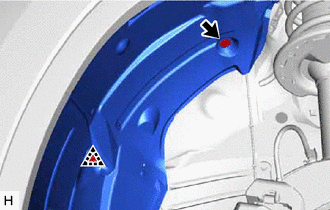
(a) Remove the screw and clip to separate the front fender splash shield sub-assembly.
3. REMOVE FRONT SPEED SENSOR (w/o AVS)
(a) Turn back the front fender splash shield sub-assembly.
| (b) Disconnect the front speed sensor connector. |
|
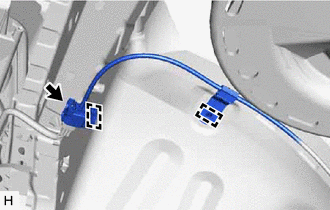
(c) Disengage the 2 sensor clamps.
| (d) Remove the bolt and sensor clamp. |
|
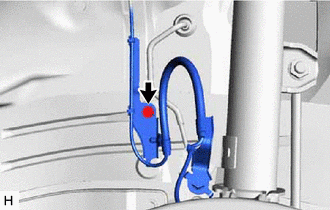
| (e) Remove the bolt and separate the front flexible hose and sensor clamp. |
|
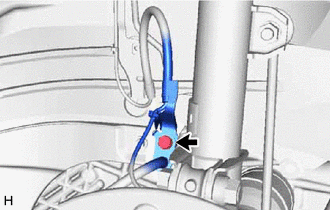
| (f) Disengage the 2 claws to separate the sensor clamp. |
|
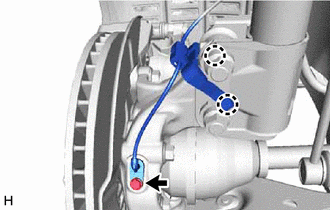
(g) Remove the bolt and front speed sensor from the steering knuckle.
NOTICE:
- Keep the tip of the front speed sensor and installation hole free of foreign matter.
- Do not rotate or apply excessive force to the front speed sensor when removing it from the steering knuckle. Rotating or applying excessive force may result in damage to the front speed sensor.
4. REMOVE FRONT SPEED SENSOR (w/ AVS)
| (a) Disconnect the front speed sensor connector. |
|
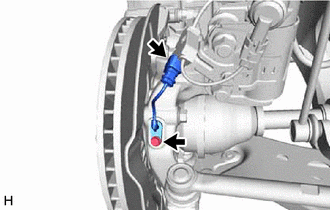
(b) Remove the bolt and front speed sensor from the steering knuckle.
NOTICE:
- Keep the tip of the front speed sensor and installation hole free of foreign matter.
- Do not rotate or apply excessive force to the front speed sensor when removing it from the steering knuckle. Rotating or applying excessive force may result in damage to the front speed sensor.
5. REMOVE FRONT SKID CONTROL SENSOR WIRE (w/ AVS)
(a) Turn back the front fender splash shield sub-assembly.
| (b) Disconnect the front skid control sensor wire connector. |
|
(c) Disengage the 2 sensor clamps.
| (d) Remove the bolt and sensor clamp. |
|
| (e) Remove the bolt and separate the front flexible hose and sensor clamp. |
|
| (f) Disconnect the connector from the front shock absorber assembly. |
|
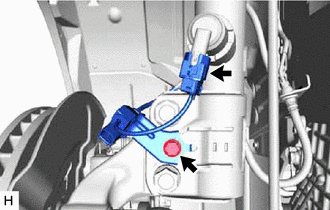
(g) Remove the bolt and front skid control sensor wire from the front shock absorber assembly.
 Installation
INSTALLATION CAUTION / NOTICE / HINT HINT:
Use the same procedure for the RH side and LH side.
The following procedure is for the LH side.
If the front speed sensor rotor needs to be replaced, ...

Other materials:
Lexus RX (RX 350L, RX450h) 2016-2026 Repair Manual > Power Tilt And Power Telescopic Steering Column System: Customize Parameters
CUSTOMIZE PARAMETERS CUSTOMIZE POWER TILT AND POWER TELESCOPIC STEERING COLUMN SYSTEM HINT: The following items can be customized. NOTICE:
When the customer requests a change in a function, first make sure that the function can be customized.
Record the current settings before customizing.
( ...
Lexus RX (RX 350L, RX450h) 2016-2026 Repair Manual > Power Steering System: Short in Motor Circuit (C1521-C1523,C1528,C1531-C1555)
DESCRIPTION DTC No. Detection Item DTC Detection Condition Trouble Area Warning Indicate Return-to-normal Condition Note C1521 Short in Motor Circuit Motor overcurrent Power steering ECU assembly EPS warning light: Comes on Engine switch on (IG) again - C1522 Pow ...
Lexus RX (RX 350L, RX450h) 2016-{YEAR} Owners Manual
- For your information
- Pictorial index
- For safety and security
- Instrument cluster
- Operation of each component
- Driving
- Lexus Display Audio system
- Interior features
- Maintenance and care
- When trouble arises
- Vehicle specifications
- For owners
Lexus RX (RX 350L, RX450h) 2016-{YEAR} Repair Manual

0.0163