
Lexus RX (RX 350L, RX450h) 2016-2026 Repair Manual: Check Mode Procedure
CHECK MODE PROCEDURE
DESCRIPTION
(a) Check mode has a higher sensitivity to malfunctions and can detect malfunctions that normal mode cannot detect. Check mode can also detect all of the malfunctions that normal mode can detect. In check mode, DTCs are detected with 1 trip detection logic.
CHECK MODE PROCEDURE
(a) Make sure that the following conditions are met:
(1) The battery voltage is 11 V or more.
(2) The throttle valve is fully closed.
(3) The shift lever is in P or N.
(4) The air conditioning is off.
(b) Connect the Techstream to the DLC3.
(c) Turn the engine switch on (IG).
(d) Turn the Techstream on.
(e) Enter the following menus: Powertrain / Transmission / Utility / Check Mode.
Powertrain > Transmission > Utility| Tester Display |
|---|
| Check Mode |
(f) Change the ECM to check mode and check that the MIL flashes as shown in the illustration.
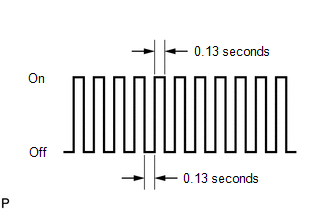
NOTICE:
All DTCs and freeze frame data will be cleared if: 1) the Techstream is used to change the ECM from normal mode to check mode or vice versa; or 2) during check mode, the engine switch is turned from on (IG) to on (ACC) or off.
Before entering check mode, make a note of the DTCs and freeze frame data.
(g) Start the engine. The MIL should turn off after the engine starts.
(h) Perform Monitor Drive Pattern for the ECT.
Click here .gif)
(Or, simulate the conditions of the malfunction described by the customer.)
(i) After simulating the malfunction conditions, use the Techstream to check for DTCs and freeze frame data.
 Dtc Check / Clear
DTC CHECK / CLEAR NOTICE: When the diagnosis system is changed from normal mode to check mode or vice versa, all DTCs and freeze frame data recorded in normal mode are cleared. Before changing modes, ...
 Fail-safe Chart
FAIL-SAFE CHART Description The fail-safe function minimizes the loss of operation when a malfunction occurs in a sensor or solenoid. Fail-safe (a) Fail-safe control list: Malfunctioning Part Fun ...
Other materials:
Lexus RX (RX 350L, RX450h) 2016-2026 Repair Manual > Can Communication System: Rear Television Camera Communication Stop Mode
DESCRIPTION Detection Item Symptom Trouble Area Rear Television Camera Communication Stop Mode Either condition is met:
"Parking Assist Monitor System" is not displayed on the CAN Bus Check screen of the Techstream.
Click here
Communication system DTCs (DTCs that start with U) ...
Lexus RX (RX 350L, RX450h) 2016-2026 Repair Manual > Rear Seatback Heater (for 60/40 Split Seat Type Rh Side): Inspection
INSPECTION PROCEDURE 1. INSPECT SEAT HEATER ASSEMBLY (a) Measure the resistance according to the value(s) in the table below. Standard Resistance: Tester Connection Condition Specified Condition 1 - 2 Seat heater temperature 20 °C (68 °F) 3.98 to 4.78 Ω If the result is not ...
Lexus RX (RX 350L, RX450h) 2016-{YEAR} Owners Manual
- For your information
- Pictorial index
- For safety and security
- Instrument cluster
- Operation of each component
- Driving
- Lexus Display Audio system
- Interior features
- Maintenance and care
- When trouble arises
- Vehicle specifications
- For owners
Lexus RX (RX 350L, RX450h) 2016-{YEAR} Repair Manual

0.0153