
Lexus RX (RX 350L, RX450h) 2016-2026 Repair Manual: Removal
REMOVAL
CAUTION / NOTICE / HINT
The necessary procedures (adjustment, calibration, initialization or registration) that must be performed after parts are removed and installed, or replaced during driving support buzzer removal/installation are shown below.
Necessary Procedures After Parts Removed/Installed/Replaced| Replaced Part or Performed Procedure | Necessary Procedure | Effect/Inoperative Function when Necessary Procedure not Performed | Link |
|---|---|---|---|
| Disconnect cable from negative battery terminal | Memorize steering angle neutral point | Lane Control System | |
| Intelligent Clearance Sonar System*1 | |||
| Pre-collision system | |||
| Lighting System (w/ Automatic Headlight Beam Level Control System) | | ||
| Parking Assist Monitor System | | ||
| Panoramic View Monitor System | | ||
| Initialize back door lock | Power Door Lock Control System | | |
| Reset back door close position | Power Back Door System (w/ Outside Door Control Switch) | |
*1: When performing learning using the Techstream.
Click here .gif)
PROCEDURE
1. REMOVE INSTRUMENT PANEL JUNCTION BLOCK ASSEMBLY WITH MAIN BODY ECU
Click here
2. REMOVE SKID CONTROL BUZZER ASSEMBLY
| (a) Using a clip remover, disengage the clamp. |
|
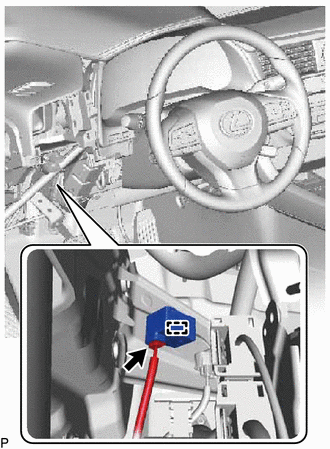
(b) Disconnect the connector to remove the skid control buzzer assembly.
NOTICE:
If the skid control buzzer assembly has been struck or dropped, replace it with a new one.
 Components
COMPONENTS ILLUSTRATION *1 SKID CONTROL BUZZER ASSEMBLY - - ...
 Inspection
INSPECTION PROCEDURE 1. INSPECT SKID CONTROL BUZZER ASSEMBLY (a) Make sure that there is no looseness in the locking part and connecting part of the connector. (b) Disconnect the skid c ...
Other materials:
Lexus RX (RX 350L, RX450h) 2016-2026 Repair Manual > Airbag System: Problem Symptoms Table
PROBLEM SYMPTOMS TABLE HINT:
Use the table below to help determine the cause of problem symptoms. If multiple suspected areas are listed, the potential causes of the symptoms are listed in order of probability in the "Suspected Area" column of the table. Check each symptom by checking the suspect ...
Lexus RX (RX 350L, RX450h) 2016-2026 Repair Manual > Exterior Panels / Trim: Quarter Panel Wheel Opening Moulding
ComponentsCOMPONENTS ILLUSTRATION *1 NO. 6 ROCKER PANEL MOULDING PROTECTOR *2 QUARTER OUTSIDE MOULDING SUB-ASSEMBLY *3 QUARTER PANEL WHEEL OPENING MOULDING - - ● Non-reusable part - - InstallationINSTALLATION CAUTION / NOTICE / HINT HINT:
Use the same procedure ...
Lexus RX (RX 350L, RX450h) 2016-{YEAR} Owners Manual
- For your information
- Pictorial index
- For safety and security
- Instrument cluster
- Operation of each component
- Driving
- Lexus Display Audio system
- Interior features
- Maintenance and care
- When trouble arises
- Vehicle specifications
- For owners
Lexus RX (RX 350L, RX450h) 2016-{YEAR} Repair Manual

0.0089