
Lexus RX (RX 350L, RX450h) 2016-2026 Repair Manual: Terminals Of Ecu
TERMINALS OF ECU
CHECK FORWARD RECOGNITION CAMERA
.png)
NOTICE:
- DTCs may be output when connectors are disconnected during inspection. Therefore, be sure to clear the DTCs using the Techstream once the inspection has been completed.
- Do not apply excessive force to the forward recognition camera connector.
(a) Measure the voltage and resistance according to the value(s) in the table below.
| Terminal No. (Symbol) | Wiring Color | Terminal Description | Condition | Specified Condition |
|---|---|---|---|---|
| U14-1 (HTR) - U14-10 (GND) | B - BR | Forward recognition with heater hood sub-assembly operation signal | Engine switch on (IG) Forward recognition with heater hood sub-assembly not operating | 11 to 14 V |
| Engine switch on (IG) Forward recognition with heater hood sub-assembly operating | Below 1 V | |||
| U14-7 (IGB) - U14-10 (GND) | SB - BR | Power source | Engine switch on (IG) | 11 to 14 V |
| Engine switch off | Below 1 V | |||
| U14-8 (BZ) - U14-10 (GND) | W - BR | Skid control buzzer assembly output | Engine switch on (IG), buzzer not sounding | 11 to 14 V |
| Engine switch on (IG), buzzer sounding | Below 1 V | |||
| U14-10 (GND) - Body ground | BR - Body ground | Ground | Always | Below 1 Ω |
(b) Check for pulses according to the value(s) in the table below.
HINT:
If the waveform is not similar to that shown in the illustration, a malfunction of a CAN bus line, terminating resistor, or the forward recognition camera is suspected.
| Terminal No. (Symbol) | Wiring Color | Terminal Description | Condition | Specified Condition |
|---|---|---|---|---|
| U14-5 (CA1P) - U14-10 (GND) | V - BR | CAN communication signal | Engine switch on (IG) | Pulse generation (See waveform 1) |
| U14-6 (CANH) - U14-10 (GND) | B - BR | CAN communication signal | Engine switch on (IG) | Pulse generation (See waveform 1) |
| U14-11 (CA1N) - U14-10 (GND) | P - BR | CAN communication signal | Engine switch on (IG) | Pulse generation (See waveform 2) |
| U14-12 (CANL) - U14-10 (GND) | W - BR | CAN communication signal | Engine switch on (IG) | Pulse generation (See waveform 2) |
(1) Waveform 1
| Item | Content |
|---|---|
| Tester Connection |
|
| Tool Setting | 1 V/DIV., 10 μs./DIV. |
| Condition | Engine switch on (IG) |
HINT:
The waveform varies depending on the CAN communication signal.
.png)
(2) Waveform 2
| Item | Content |
|---|---|
| Tester Connection |
|
| Tool Setting | 1 V/DIV., 10 μs./DIV. |
| Condition | Engine switch on (IG) |
HINT:
The waveform varies depending on the CAN communication signal.
.png)
CHECK STEERING VIBRATION ECU
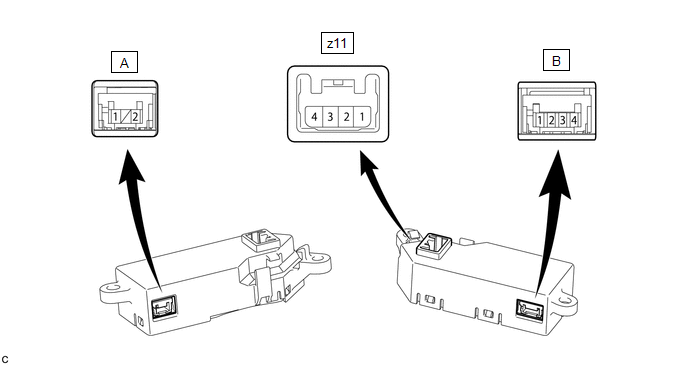
NOTICE:
DTCs may be output when connectors are disconnected during inspection. Therefore, be sure to clear the DTCs using the Techstream once the inspection has been completed.
(a) Measure the voltage and resistance according to the value(s) in the table below.
| Terminal No. (Symbol) | Terminal Description | Condition | Specified Condition |
|---|---|---|---|
| z11-4 (IG) - z11-1 (GND) | Power source | Engine switch on (IG) | Pulse generation |
| Engine switch off | Below 1 V | ||
| B-1 (M+) - z11-1 (GND) | Steering vibration operation signal | Engine switch on (IG) Steering vibration operating | 11 to 14 V |
| Engine switch on (IG) Steering vibration not operating | Below 1 V | ||
| z11-1 (GND) - Body ground | Ground | Always | Below 1 Ω |
(b) Measure the waveform according to the value(s) in the table below.
| Terminal No. (Symbol) | Terminal Description | Condition | Specified Condition |
|---|---|---|---|
| A-2 (LDA) - z11-1 (GND) | LIN communication signal | Engine switch on (IG) | Pulse generation |
 Problem Symptoms Table
PROBLEM SYMPTOMS TABLE HINT:
Use the table below to help determine the cause of problem symptoms. If multiple suspected areas are listed, the potential causes of the symptoms are listed in order of ...
 Data List / Active Test
DATA LIST / ACTIVE TEST NOTICE: In the table below, the values listed under "Normal Condition" are reference values. Do not depend solely on these reference values when deciding whether a part is faul ...
Other materials:
Lexus RX (RX 350L, RX450h) 2016-2026 Repair Manual > Rear Seat Assembly (for 60/40 Split Seat Type Rh Side): Disassembly
DISASSEMBLY CAUTION / NOTICE / HINT CAUTION: Wear protective gloves. Sharp areas on the seat frame may injure your hands. PROCEDURE 1. REMOVE REAR SEAT COVER CAP RH (for Manual Seat) (a) Using a screwdriver with its tip wrapped with protective tape, disengage the 2 claws and remove the rear seat cov ...
Lexus RX (RX 350L, RX450h) 2016-2026 Owners Manual > Lexus RX (RX 350L, RX450h) 2016-2026 Owners Manual: Pictorial index
Exterior
The shape of the lights may differ depending on the grade, etc.
Side doors
Locking/unlocking
Opening/closing the side windows
Locking/unlocking by using the mechanical key
Back door
Opening from inside the cabin
Opening from outside
Outside rear view mirrors
Adjusting ...
Lexus RX (RX 350L, RX450h) 2016-{YEAR} Owners Manual
- For your information
- Pictorial index
- For safety and security
- Instrument cluster
- Operation of each component
- Driving
- Lexus Display Audio system
- Interior features
- Maintenance and care
- When trouble arises
- Vehicle specifications
- For owners
Lexus RX (RX 350L, RX450h) 2016-{YEAR} Repair Manual

0.0114