
Lexus RX (RX 350L, RX450h) 2016-2026 Repair Manual: Back Door Motor Circuit (B2220)
DESCRIPTION
This DTC is stored when the multiplex network door ECU detects a malfunction of the motor built-into the power back door unit assembly set LH or power back door unit assembly set RH.
| DTC No. | Detection Item | DTC Detection Condition | Trouble Area |
|---|---|---|---|
| B2220 | Back Door Motor Circuit | Malfunction of motor built into the power back door unit assembly set LH or power back door unit assembly set RH detected |
|
WIRING DIAGRAM
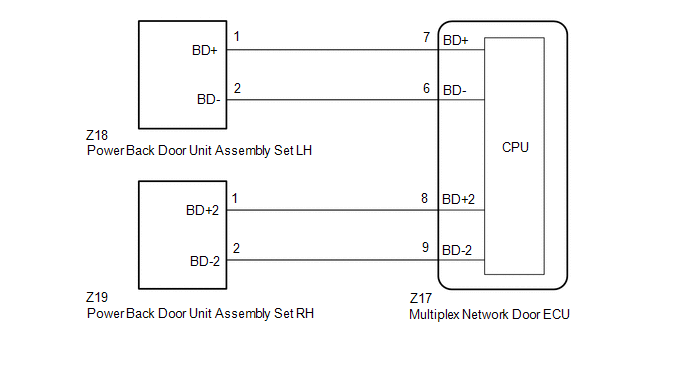
CAUTION / NOTICE / HINT
NOTICE:
If the multiplex network door ECU has been removed and installed or replaced, or if any of the connectors have been disconnected, initialize the power back door system.
Click here .gif)
PROCEDURE
| 1. | CHECK FOR DTC |
(a) Connect the Techstream to the DLC3.
(b) Turn the engine switch on (IG).
(c) Turn the Techstream on.
(d) Enter the following menus: Body Electrical / Back Door / Trouble Codes.
(e) Clear the DTCs.
Body Electrical > Back Door > Clear DTCs(f) Recheck for DTCs.
Body Electrical > Back Door > Trouble CodesOK:
DTC B2220 is not output.
| OK | .gif) | USE SIMULATION METHOD TO CHECK |
|
.gif)
| 2. | INSPECT POWER BACK DOOR UNIT ASSEMBLY SET LH |
(a) Fully open the back door.
| (b) Disconnect the power back door unit assembly set LH connector. |
|
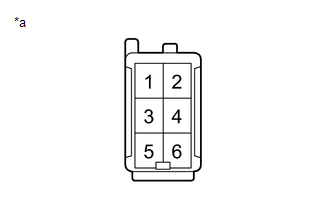
(c) Measure the resistance according to the value(s) in the table below.
Standard Resistance:
| Tester Connection | Condition | Specified Condition |
|---|---|---|
| 1 - Body ground | Always | 10 kΩ or higher |
| 2 - Body ground | Always | 10 kΩ or higher |
| 1 - 2 | Always | Below 1 MΩ |
| NG | | REPLACE POWER BACK DOOR UNIT ASSEMBLY SET LH |
|
| 3. | INSPECT POWER BACK DOOR UNIT ASSEMBLY SET RH |
(a) Fully open the back door.
| (b) Disconnect the power back door unit assembly set RH connector. |
|
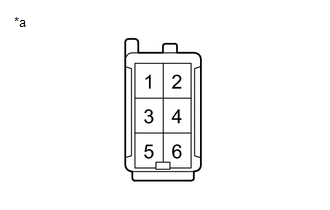
(c) Measure the resistance according to the value(s) in the table below.
Standard Resistance:
| Tester Connection | Condition | Specified Condition |
|---|---|---|
| 1 - Body ground | Always | 10 kΩ or higher |
| 2 - Body ground | Always | 10 kΩ or higher |
| 1 - 2 | Always | Below 1 MΩ |
| NG | | REPLACE POWER BACK DOOR UNIT ASSEMBLY SET RH |
|
| 4. | CHECK HARNESS AND CONNECTOR (MULTIPLEX NETWORK DOOR ECU - POWER BACK DOOR UNIT ASSEMBLY SET LH) |
(a) Disconnect the Z17 multiplex network door ECU connector.
(b) Measure the resistance according to the value(s) in the table below.
Standard Resistance:
| Tester Connection | Condition | Specified Condition |
|---|---|---|
| Z17-7 (BD+) - Z18-1 (BD+) | Always | Below 1 Ω |
| Z17-6 (BD-) - Z18-2 (BD-) | Always | Below 1 Ω |
| Z17-7 (BD+) or Z18-1 (BD+) - Body ground | Always | 10 kΩ or higher |
| Z17-6 (BD-) or Z18-2 (BD-) - Body ground | Always | 10 kΩ or higher |
| NG | | REPAIR OR REPLACE HARNESS OR CONNECTOR |
|
| 5. | CHECK HARNESS AND CONNECTOR (MULTIPLEX NETWORK DOOR ECU - POWER BACK DOOR UNIT ASSEMBLY SET RH) |
(a) Measure the resistance according to the value(s) in the table below.
Standard Resistance:
| Tester Connection | Condition | Specified Condition |
|---|---|---|
| Z17-8 (BD+2) - Z19-1 (BD+2) | Always | Below 1 Ω |
| Z17-9 (BD-2) - Z19-2 (BD-2) | Always | Below 1 Ω |
| Z17-8 (BD+2) or Z19-1 (BD+2) - Body ground | Always | 10 kΩ or higher |
| Z17-9 (BD-2) or Z19-2 (BD-2) - Body ground | Always | 10 kΩ or higher |
| OK | | REPLACE MULTIPLEX NETWORK DOOR ECU |
| NG | | REPAIR OR REPLACE HARNESS OR CONNECTOR |
 Kick Sensor Circuit (B2205)
DESCRIPTION B2205 is output when the multiplex network door ECU detects that the kick door control sensor is stuck on. DTC No. Detection Item DTC Detection Condition Trouble Area B2205 ...
 PBD Unit Pulse Sensor LH Circuit (B2226)
DESCRIPTION This DTC is stored when the multiplex network door ECU detects an error in the power back door unit assembly set LH pulse signal. DTC No. Detection Item DTC Detection Condition Tr ...
Other materials:
Lexus RX (RX 350L, RX450h) 2016-2026 Repair Manual > Fuel Pump (for Tmmc Made): Removal
REMOVAL CAUTION / NOTICE / HINT The necessary procedures (adjustment, calibration, initialization or registration) that must be performed after parts are removed and installed, or replaced during fuel pump removal/installation are shown below. Necessary Procedures After Parts Removed/Installed/Repla ...
Lexus RX (RX 350L, RX450h) 2016-2026 Repair Manual > Headup Display System: Data List / Active Test
DATA LIST / ACTIVE TEST DATA LIST NOTICE: In the table below, the values listed under "Normal Condition" are reference values. Do not depend solely on these reference values when deciding whether a part is faulty or not. HINT: Using the Techstream to read the Data List allows the values or states of ...
Lexus RX (RX 350L, RX450h) 2016-{YEAR} Owners Manual
- For your information
- Pictorial index
- For safety and security
- Instrument cluster
- Operation of each component
- Driving
- Lexus Display Audio system
- Interior features
- Maintenance and care
- When trouble arises
- Vehicle specifications
- For owners
Lexus RX (RX 350L, RX450h) 2016-{YEAR} Repair Manual

0.0133