
Lexus RX (RX 350L, RX450h) 2016-2026 Repair Manual: Reassembly
REASSEMBLY
PROCEDURE
1. INSTALL CENTER STOP LIGHT ASSEMBLY
Click here .gif)
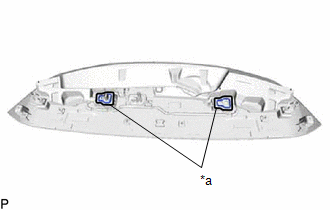
2. INSTALL NO. 2 REAR SPOILER SEAL
HINT:
When installing the No. 2 rear spoiler seal, heat the rear spoiler using a heat light.
Heating Temperature| Item | Temperature |
|---|---|
| Rear Spoiler | 20 to 30°C (68 to 86°F) |
CAUTION:
- Do not touch the heat light and heated parts, touching the heat light may result in burns.
- Touching heated parts for a long time may result in burns.
.png)
| *a | Heated Part |
| *b | Heat Light |
NOTICE:
Do not heat the rear spoiler excessively.
(a) Clean the rear spoiler surface.
(1) Using a heat light, heat the rear spoiler surface.
(2) Remove the double-sided tape from the rear spoiler.
(3) Wipe off any tape adhesive residue with cleaner.
(b) Using a heat light, heat the rear spoiler.
(c) Remove the release paper from the 2 new No. 2 rear spoiler seals.
HINT:
After removing the release paper, keep the exposed adhesive free from foreign matter.
| (d) Install the 2 No. 2 rear spoiler seals as shown in the illustration. HINT: Apply the No. 2 rear spoiler seal along the line marked on the rear spoiler. |
|
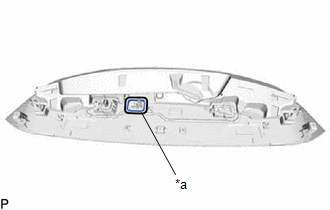
3. INSTALL REAR SPOILER SEAL
HINT:
When installing the rear spoiler seal, heat the rear spoiler using a heat light.
Heating Temperature| Item | Temperature |
|---|---|
| Rear Spoiler | 20 to 30°C (68 to 86°F) |
CAUTION:
- Do not touch the heat light and heated parts, touching the heat light may result in burns.
- Touching heated parts for a long time may result in burns.
| *a | Heated Part |
| *b | Heat Light |
NOTICE:
Do not heat the rear spoiler excessively.
(a) Clean the rear spoiler surface.
(1) Using a heat light, heat the rear spoiler surface.
(2) Remove the double-sided tape from the rear spoiler.
(3) Wipe off any tape adhesive residue with cleaner.
(b) Using a heat light, heat the rear spoiler.
(c) Remove the release paper from a new rear spoiler seal.
HINT:
After removing the release paper, keep the exposed adhesive free from foreign matter.
| (d) Install the rear spoiler seal as shown in the illustration. HINT: Apply the rear spoiler seal along the line marked on the rear spoiler. |
|
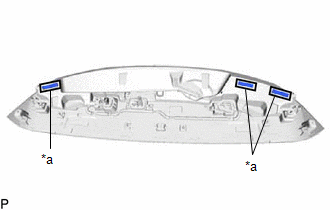
4. INSTALL NO. 2 REAR SPOILER PROTECTOR (except TMMC Made)
HINT:
When installing the No. 2 rear spoiler protector, heat the rear spoiler using a heat light.
Heating Temperature| Item | Temperature |
|---|---|
| Rear Spoiler | 20 to 30°C (68 to 86°F) |
CAUTION:
- Do not touch the heat light and heated parts, touching the heat light may result in burns.
- Touching heated parts for a long time may result in burns.
| *a | Heated Part |
| *b | Heat Light |
NOTICE:
Do not heat the rear spoiler excessively.
(a) Clean the rear spoiler surface.
(1) Using a heat light, heat the rear spoiler surface.
(2) Remove the double-sided tape from the rear spoiler.
(3) Wipe off any tape adhesive residue with cleaner.
(b) Using a heat light, heat the rear spoiler.
(c) Remove the release paper from the 3 new No. 2 rear spoiler protectors.
HINT:
After removing the release paper, keep the exposed adhesive free from foreign matter.
| (d) Install the 3 No. 2 rear spoiler protectors as shown in the illustration. HINT: Apply the No. 2 rear spoiler protector along the line marked on the rear spoiler. |
|
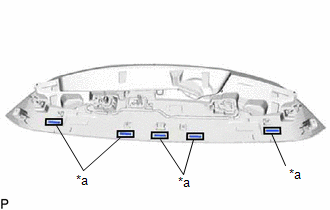
5. INSTALL NO. 1 REAR SPOILER PROTECTOR (except TMMC Made)
HINT:
When installing the No. 1 rear spoiler protector, heat the rear spoiler using a heat light.
Heating Temperature| Item | Temperature |
|---|---|
| Rear Spoiler | 20 to 30°C (68 to 86°F) |
CAUTION:
- Do not touch the heat light and heated parts, touching the heat light may result in burns.
- Touching heated parts for a long time may result in burns.
| *a | Heated Part |
| *b | Heat Light |
NOTICE:
Do not heat the rear spoiler excessively.
(a) Clean the rear spoiler surface.
(1) Using a heat light, heat the rear spoiler surface.
(2) Remove the double-sided tape from the rear spoiler.
(3) Wipe off any tape adhesive residue with cleaner.
(b) Using a heat light, heat the rear spoiler.
(c) Remove the release paper from the 5 new No. 1 rear spoiler protectors.
HINT:
After removing the release paper, keep the exposed adhesive free from foreign matter.
| (d) Install the 5 No. 1 rear spoiler protectors as shown in the illustration. HINT: Apply the No. 1 rear spoiler protector along the line marked on the rear spoiler. |
|
 Installation
INSTALLATION PROCEDURE 1. INSTALL SIDE REAR SPOILER PROTECTOR SUB-ASSEMBLY LH (a) Install 3 new clips to the side rear spoiler protector sub-assembly LH. (b) Engage the 4 clips as shown in the illustr ...
 Removal
REMOVAL PROCEDURE 1. REMOVE BACK WINDOW UPPER PANEL TRIM (w/o Rear No. 2 Seat) Click here 2. REMOVE BACK WINDOW UPPER PANEL TRIM (w/ Rear No. 2 Seat) Click here 3. REMOVE REAR SPOILER SUB-ASSEMB ...
Other materials:
Lexus RX (RX 350L, RX450h) 2016-2026 Repair Manual > Lexus Enform System: Operation Check
OPERATION CHECK LEXUS APP SUITE RESET PROCEDURE (a) Duplicate the problem symptom. (b) Check for DTCs and repair the systems for which any DTCs are output. Click here (c) Check cellular phone compatibility. (1) Check if the cellular phone/vehicle is compatible (Refer to http://www.lexus.com/Mobile ...
Lexus RX (RX 350L, RX450h) 2016-2026 Repair Manual > Rear Differential Carrier Assembly: Reassembly
REASSEMBLY CAUTION / NOTICE / HINT NOTICE:
Before installation, thoroughly clean and dry each part and then apply Toyota Genuine Differential gear oil LT SAE 75W-85 GL-5 or equivalent to them.
Do not use alkaline cleaner for aluminum or rubber parts and rear differential case bolts.
Do not cl ...
Lexus RX (RX 350L, RX450h) 2016-{YEAR} Owners Manual
- For your information
- Pictorial index
- For safety and security
- Instrument cluster
- Operation of each component
- Driving
- Lexus Display Audio system
- Interior features
- Maintenance and care
- When trouble arises
- Vehicle specifications
- For owners
Lexus RX (RX 350L, RX450h) 2016-{YEAR} Repair Manual

0.01