
Lexus RX (RX 350L, RX450h) 2016-2026 Repair Manual: Removal
REMOVAL
PROCEDURE
1. CHANGE POWER TILT AND POWER TELESCOPIC STEERING COLUMN SYSTEM SETTINGS
Click here .gif)
2. REMOVE LOWER STEERING COLUMN COVER
NOTICE:
Removing the lower steering column cover in the incorrect order will cause the parts to break.
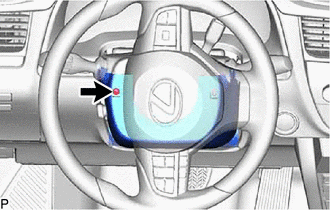
| (a) Turn the steering wheel assembly to the left and remove the screw. |
|
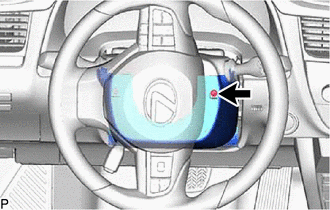
| (b) Turn the steering wheel assembly to the right and remove the screw. |
|
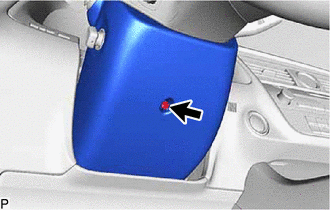
| (c) Remove the screw. |
|
(d) Push the left side of the lower steering column cover and disengage the claw as shown in the illustration.
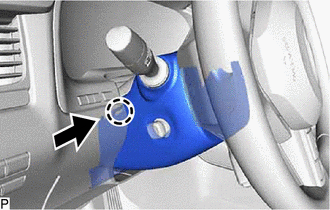
.png) | Push |
(e) Push the right side of the lower steering column cover and disengage the claw as shown in the illustration.
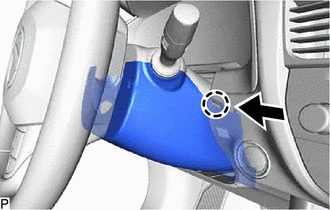
| | Push |
(f) Disengage the 2 claws to remove the lower steering column cover as shown in the illustration.
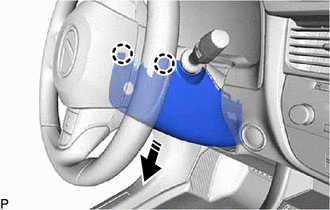
.png) | Remove in this Direction |
3. REMOVE UPPER STEERING COLUMN COVER
| (a) Disengage the 2 claws and 4 clips to separate the instrument cluster finish panel sub-assembly. |
|
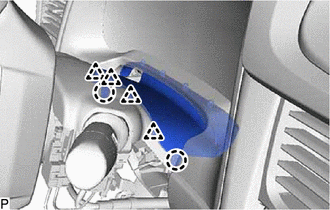
(b) Disengage the claw to remove the upper steering column cover as shown in the illustration.
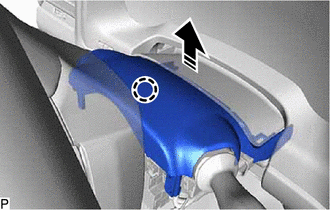
| | Remove in this Direction |
4. REMOVE WINDSHIELD WIPER SWITCH ASSEMBLY
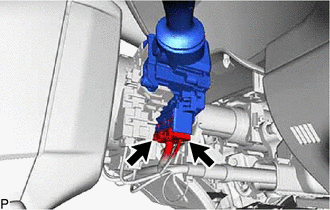
| (a) Disconnect the 2 connectors. |
|
(b) Using a screwdriver, disengage the claw and remove the windshield wiper switch assembly as shown in the illustration.
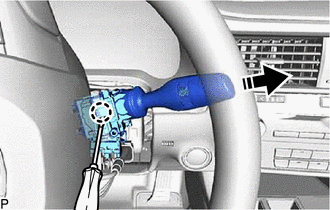
| | Remove in this Direction |
NOTICE:
If the claw is pulled with excessive force, it may break.
 Inspection
INSPECTION PROCEDURE 1. INSPECT WINDSHIELD WIPER SWITCH ASSEMBLY (a) Measure the resistance according to the value(s) in the table below. Standard Resistance: Front Washer Switch Tester Connect ...
 Installation
INSTALLATION PROCEDURE 1. INSTALL WINDSHIELD WIPER SWITCH ASSEMBLY (a) Engage the claw as shown in the illustration to install the windshield wiper switch assembly. Install in this Direction ...
Other materials:
Lexus RX (RX 350L, RX450h) 2016-2026 Repair Manual > Inner Rear View Mirror: Installation
INSTALLATION PROCEDURE 1. INSTALL INNER REAR VIEW MIRROR ASSEMBLY (a) Slide and temporarily install the inner rear view mirror assembly as shown in the illustration. Install in this Direction (b) Using a T20 "TORX" socket wrench, install the inner rear view mirror assembly with the screw. ...
Lexus RX (RX 350L, RX450h) 2016-2026 Repair Manual > Lexus Enform System: Operation Check
OPERATION CHECK LEXUS APP SUITE RESET PROCEDURE (a) Duplicate the problem symptom. (b) Check for DTCs and repair the systems for which any DTCs are output. Click here (c) Check cellular phone compatibility. (1) Check if the cellular phone/vehicle is compatible (Refer to http://www.lexus.com/Mobile ...
Lexus RX (RX 350L, RX450h) 2016-{YEAR} Owners Manual
- For your information
- Pictorial index
- For safety and security
- Instrument cluster
- Operation of each component
- Driving
- Lexus Display Audio system
- Interior features
- Maintenance and care
- When trouble arises
- Vehicle specifications
- For owners
Lexus RX (RX 350L, RX450h) 2016-{YEAR} Repair Manual

0.0103