
Lexus RX (RX 350L, RX450h) 2016-2026 Repair Manual: Radio Broadcast cannot be Received or Poor Reception
CAUTION / NOTICE / HINT
NOTICE:
Depending on the parts that are replaced during vehicle inspection or maintenance, performing initialization, registration or calibration may be needed. Refer to Precaution for Audio and Visual System.
Click here .gif)
PROCEDURE
| 1. | CHECK RADIO RECEIVER ASSEMBLY |
(a) Check the radio automatic station search function.
(1) Check the radio automatic station search function by activating it.
| Result | Proceed to |
|---|---|
| Automatic station search function does not stop. | A |
| Automatic station search function stops on a station. | B |
| B |  | REPLACE RADIO RECEIVER ASSEMBLY |
|

| 2. | CHECK OPTIONAL COMPONENTS |
(a) Check if any optional components that may decrease reception capacity, such as a sunshade film or telephone antenna, are installed.
| Result | Proceed to |
|---|---|
| Optional components are not installed. | A |
| Optional components are installed. | B |
NOTICE:
Do not remove optional components without the permission of the customer.
| B | | REMOVE OPTIONAL COMPONENTS AND CHECK AGAIN (SEE NOTICE ABOVE) |
|
| 3. | CHECK RADIO RECEIVER ASSEMBLY |
| (a) Preparation for check (1) Disconnect the antenna connector from the radio receiver assembly. |
|
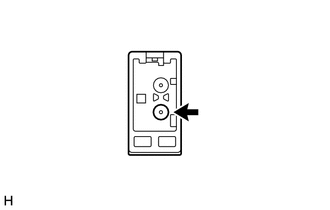
(b) Check for noise
(1) Turn the engine switch on (ACC) with the radio receiver assembly connector connected.
(2) Turn the radio on and tune into AM mode.
(3) Place a screwdriver, thin wire or other metal object on the radio receiver assembly antenna jack and check that noise can be heard from the speakers.
OK:
Noise can be heard from the speakers.
| NG | | REPLACE RADIO RECEIVER ASSEMBLY |
|
| 4. | INSPECT RADIO RECEIVER ASSEMBLY |
(a) Disconnect the RA radio receiver assembly connector.
| (b) Measure the voltage according to the value(s) in the table below. Standard Voltage:
|
|
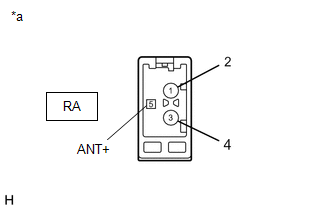
| NG | | REPLACE RADIO RECEIVER ASSEMBLY |
|
| 5. | REPLACE ANTENNA CORD SUB-ASSEMBLY |
(a) Replace the antenna cord sub-assembly with a new or known good one and check if radio broadcasts can be received normally.
w/o Rear No. 2 Seat: Click here
w/ Rear No. 2 Seat: Click here
OK:
Radio broadcasts can be received normally.
| OK | | END |
|
| 6. | REPLACE NO. 2 ANTENNA CORD SUB-ASSEMBLY |
(a) Replace the No. 2 antenna cord sub-assembly with a new or known good one and check if radio broadcasts can be received normally.
w/o Rear No. 2 Seat: Click here
w/ Rear No. 2 Seat: Click here
OK:
Radio broadcasts can be received normally.
| Result | Proceed to |
|---|---|
| OK | A |
| NG (w/o Rear No. 2 Seat) | B |
| NG (w/ Rear No. 2 Seat (w/ SXM Function)) | C |
| NG (w/ Rear No. 2 Seat (w/o SXM Function)) | D |
| A | | END |
| C | | GO TO STEP 9 |
| D | | GO TO STEP 12 |
|
| 7. | REPLACE NO. 3 ANTENNA CORD SUB-ASSEMBLY |
(a) Replace the No. 3 antenna cord sub-assembly with a new or known good one and check if radio broadcasts can be received normally.
Click here
OK:
Radio broadcasts can be received normally.
| OK | | END |
|
| 8. | REPLACE REAR SPOILER SUB-ASSEMBLY |
(a) Replace the rear spoiler sub-assembly with a new or known good one and check if radio broadcasts can be received normally.
Click here
OK:
Radio broadcasts can be received normally.
| OK | | END |
| NG | | REPLACE RADIO RECEIVER ASSEMBLY |
| 9. | REPLACE NO. 6 ANTENNA CORD SUB-ASSEMBLY |
(a) Replace the No. 6 antenna cord sub-assembly with a new or known good one and check if radio broadcasts can be received normally.
Click here
OK:
Radio broadcasts can be received normally.
| OK | | END |
|
| 10. | REPLACE NO. 3 ANTENNA CORD SUB-ASSEMBLY |
(a) Replace the No. 3 antenna cord sub-assembly with a new or known good one and check if radio broadcasts can be received normally.
Click here
OK:
Radio broadcasts can be received normally.
| OK | | END |
|
| 11. | REPLACE REAR SPOILER SUB-ASSEMBLY |
(a) Replace the rear spoiler sub-assembly with a new or known good one and check if radio broadcasts can be received normally.
Click here
OK:
Radio broadcasts can be received normally.
| OK | | END |
| NG | | REPLACE RADIO RECEIVER ASSEMBLY |
| 12. | REPLACE NO. 5 ANTENNA CORD SUB-ASSEMBLY |
(a) Replace the No. 5 antenna cord sub-assembly with a new or known good one and check if radio broadcasts can be received normally.
Click here
OK:
Radio broadcasts can be received normally.
| OK | | END |
|
| 13. | REPLACE NO. 3 ANTENNA CORD SUB-ASSEMBLY |
(a) Replace the No. 3 antenna cord sub-assembly with a new or known good one and check if radio broadcasts can be received normally.
Click here
OK:
Radio broadcasts can be received normally.
| OK | | END |
|
| 14. | REPLACE REAR SPOILER SUB-ASSEMBLY |
(a) Replace the rear spoiler sub-assembly with a new or known good one and check if radio broadcasts can be received normally.
Click here
OK:
Radio broadcasts can be received normally.
| OK | | END |
| NG | | REPLACE RADIO RECEIVER ASSEMBLY |
 Illumination for Panel Switch does not Come on with Tail Switch ON
CAUTION / NOTICE / HINT NOTICE: Depending on the parts that are replaced during vehicle inspection or maintenance, performing initialization, registration or calibration may be needed. Refer to Precau ...
 Display does not Dim when Light Control Switch is Turned ON
DESCRIPTION When the audio and visual system is activated with the light control switch in the tail or head position, before AVC-LAN communication is established, the multi-display assembly dims the d ...
Other materials:
Lexus RX (RX 350L, RX450h) 2016-2026 Repair Manual > Fuel Tank: Components
COMPONENTS ILLUSTRATION *A for TMC Made - - *1 FUEL TANK CUSHION SET *2 NO. 5 FUEL TANK CUSHION *3 REAR FUEL TANK BRACKET LH *4 NO. 1 FUEL TANK BAND SUB-ASSEMBLY RH *5 NO. 1 FUEL TANK BAND SUB-ASSEMBLY LH *6 NO. 1 FUEL TANK PROTECTOR SUB-ASSEMBLY *7 FRON ...
Lexus RX (RX 350L, RX450h) 2016-2026 Repair Manual > Navigation System: Portable Player cannot be Operated Using In-vehicle Device or Track Information is not Displayed on In-vehicle Device
PROCEDURE 1. CHECK USING ANOTHER "Bluetooth" AUDIO COMPATIBLE VEHICLE OF SAME MODEL (a) Check if track information is displayed normally on another "Bluetooth" audio compatible vehicle of the same model. OK: Track information is displayed normally. OK PROCEED TO NEXT SUSPECTED AREA ...
Lexus RX (RX 350L, RX450h) 2016-{YEAR} Owners Manual
- For your information
- Pictorial index
- For safety and security
- Instrument cluster
- Operation of each component
- Driving
- Lexus Display Audio system
- Interior features
- Maintenance and care
- When trouble arises
- Vehicle specifications
- For owners
Lexus RX (RX 350L, RX450h) 2016-{YEAR} Repair Manual

0.0149