
Lexus RX (RX 350L, RX450h) 2016-2026 Repair Manual: Installation
INSTALLATION
PROCEDURE
1. INSTALL AIRBAG SENSOR ASSEMBLY
(a) Check that the engine switch is off.
(b) Check that the cable is disconnected from the negative (-) battery terminal.
CAUTION:
Wait at least 90 seconds after disconnecting the cable from the negative (-) battery terminal to disable the SRS system.
.png)
| (c) Install the airbag sensor assembly with the 3 bolts. Torque: 17.5 N·m {178 kgf·cm, 13 ft·lbf} NOTICE:
|
|
.png)
(d) Temporarily connect the connector and then move the lock lever in the direction indicated by the arrow to securely connect the connectors.
NOTICE:
When connecting any airbag connector, take care not to damage the airbag wire harness.
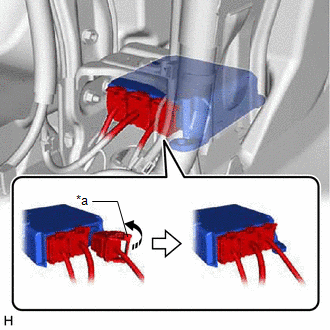
| *a | Lock Lever |
.png) | Move in this Direction |
(e) Check that there is no looseness in the installed parts of the airbag sensor assembly.
2. INSTALL FRONT NO. 1 CONSOLE BOX INSERT
Click here .gif)
3. INSTALL FRONT NO. 2 CONSOLE BOX INSERT
Click here
4. INSTALL CONSOLE BOX ASSEMBLY
Click here
5. CONNECT CABLE TO NEGATIVE BATTERY TERMINAL
NOTICE:
When disconnecting the cable, some systems need to be initialized after the cable is reconnected.
Click here
6. PERFORM DIAGNOSTIC SYSTEM CHECK
Click here
7. INSPECT SRS WARNING LIGHT
Click here
8. PERFORM CALIBRATION (w/ Optitron Meter Type)
(a) When the airbag sensor assembly (center airbag sensor assembly) is replaced, perform calibration.
for VSC System: Click here
for Dynamic Torque Control AWD System: Click here
 Removal
REMOVAL CAUTION / NOTICE / HINT The necessary procedures (adjustment, calibration, initialization, or registration) that must be performed after parts are removed, installed, or replaced during the ai ...

Other materials:
Lexus RX (RX 350L, RX450h) 2016-2026 Repair Manual > Power Window Control System: Operation Check
OPERATION CHECK CHECK WINDOW LOCK FUNCTION HINT: Before performing the window lock switch operation check, make sure that the window lock switch is off (the switch is not pushed in). (a) Turn the window lock switch of the multiplex network master switch assembly on (pushed in) and check that the fr ...
Lexus RX (RX 350L, RX450h) 2016-2026 Repair Manual > Audio And Visual System (for 12.3 Inch Display): Speaker Circuit
DESCRIPTION If there is a short in a speaker circuit, the stereo component amplifier assembly detects it and stops output to the speakers. Thus sound cannot be heard from the speakers even if there is no malfunction in the stereo component amplifier assembly or speakers. WIRING DIAGRAM for 9 Speaker ...
Lexus RX (RX 350L, RX450h) 2016-{YEAR} Owners Manual
- For your information
- Pictorial index
- For safety and security
- Instrument cluster
- Operation of each component
- Driving
- Lexus Display Audio system
- Interior features
- Maintenance and care
- When trouble arises
- Vehicle specifications
- For owners
Lexus RX (RX 350L, RX450h) 2016-{YEAR} Repair Manual

0.0161