
Lexus RX (RX 350L, RX450h) 2016-2026 Repair Manual: Touch Pad Sensor Malfunction (B1559)
DESCRIPTION
This DTC is stored if the remote touch (remote operation controller assembly) detects a malfunction in itself, such as internal hardware failure or remote touch screen sensor malfunction.
| DTC No. | Detection Item | DTC Detection Condition | Trouble Area |
|---|---|---|---|
| B1559 | Touch Pad Sensor Malfunction | Internal remote touch screen sensor malfunction | Remote touch (remote operation controller assembly) |
PROCEDURE
| 1. | CHECK DTC |
(a) Clear the DTCs.
Body Electrical > Navigation System > Clear DTCs(b) Recheck for DTCs and check that no DTCs are output.
Body Electrical > Navigation System > Trouble CodesOK:
No DTCs are output.
HINT:
-
If DTC B155B is output, perform troubleshooting for DTC B155B first.
Click here
.gif)
- Remote touch screen touch detection is performed using the electrostatic sensor and G sensor. However, there is no effect on the basic functions of the remote touch screen when the G sensor is not operating. Therefore, a counter is used to prevent DTCs from being output immediately (in order to reduce excessive DTC output). Therefore, when DTCs are not output, it is necessary to turn the engine switch from on (ACC) to off and check for DTCs again.
| OK | .gif) | USE SIMULATION METHOD TO CHECK |
|
.gif)
| 2. | REMOTE TOUCH (REMOTE OPERATION CONTROLLER ASSEMBLY) SELF CHECK (CHECK REMOTE TOUCH SCREEN OPERATION POSITION RECOGNITION CONDITION) |
(a) Enter self-diagnostic mode.
Click here
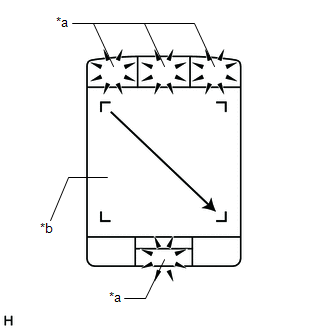
| (b) Operate the remote touch screen diagonally from the upper left to the lower right and check that the brightness of the switch illumination changes. NOTICE: Since the remote touch screen may recognize a pinch in/out operation if operated with 2 fingers, always use 1 finger to operate the remote touch screen in self-diagnostic mode. OK: Brightness changes according to remote touch screen operation.
|
|
| B | | REPLACE REMOTE TOUCH (REMOTE OPERATION CONTROLLER ASSEMBLY) |
|
| 3. | CHECK DTC |
(a) Clear the DTCs.
Body Electrical > Navigation System > Clear DTCs(b) Turn the engine switch off.
(c) Turn the engine switch on (ACC) and wait for 40 seconds.
(d) Recheck for DTCs and check that no DTCs are output.
Body Electrical > Navigation System > Trouble CodesOK:
No DTCs are output.
HINT:
Remote touch screen touch detection is performed using the electrostatic sensor and G sensor. However, there is no effect on the basic functions of the remote touch screen when the G sensor is not operating. Therefore, a counter is used to prevent DTCs from being output immediately (in order to reduce excessive DTC output). Therefore, when DTCs are not output, it is necessary to turn the engine switch from on (ACC) to off and check for DTCs again.
| OK | | USE SIMULATION METHOD TO CHECK |
| NG | | REPLACE REMOTE TOUCH (REMOTE OPERATION CONTROLLER ASSEMBLY) |
 Extension Module Malfunction 2 (B1556)
DESCRIPTION This DTC is stored when a malfunction occurs in the Navigation ECU. DTC No. Detection Item DTC Detection Condition Trouble Area B1556 Extension Module Malfunction 2 When a ...
 Touch Pad Vibration Driver Malfunction (B155A)
DESCRIPTION This DTC is stored if the remote touch (remote operation controller assembly) detects a malfunction in itself, such as internal hardware failure or remote touch screen vibration driver mal ...
Other materials:
Lexus RX (RX 350L, RX450h) 2016-2026 Repair Manual > Intelligent Clearance Sonar System: Stop Switch Circuit Malfunction (C164E)
DESCRIPTION When a stop light switch assembly circuit malfunction signal sent from the vehicle stability control system is detected by the clearance warning ECU assembly, DTC C164E is stored. DTC No. Detection Item DTC Detection Condition Trouble Area C164E Stop Switch Circuit Malfunc ...
Lexus RX (RX 350L, RX450h) 2016-2026 Repair Manual > Refrigerant Line: Removal
REMOVAL PROCEDURE 1. RECOVER REFRIGERANT FROM REFRIGERATION SYSTEM Click here 2. REMOVE PIPING CLAMP (a) for Low Pressure: (1) While pressing the end of the suction hose sub-assembly into the end of the No. 2 air conditioner tube and accessory assembly, use pliers to squeeze together both sides of ...
Lexus RX (RX 350L, RX450h) 2016-{YEAR} Owners Manual
- For your information
- Pictorial index
- For safety and security
- Instrument cluster
- Operation of each component
- Driving
- Lexus Display Audio system
- Interior features
- Maintenance and care
- When trouble arises
- Vehicle specifications
- For owners
Lexus RX (RX 350L, RX450h) 2016-{YEAR} Repair Manual

0.01