
Lexus RX (RX 350L, RX450h) 2016-2026 Repair Manual: Removal
REMOVAL
CAUTION / NOTICE / HINT
The necessary procedures (adjustment, calibration, initialization, or registration) that must be performed after parts are removed, installed, or replaced during brake pedal support assembly removal/installation are shown below.
Necessary Procedure After Parts Removed/Installed/Replaced| Replacement Part or Procedure | Necessary Procedures | Effects/Inoperative when not Performed | Link |
|---|---|---|---|
| Disconnect cable from negative battery terminal | Memorize steering angle neutral point | Lane control system | |
| Pre-collision system | |||
| Intelligent clearance sonar system | |||
| Lighting system (w/ Automatic Headlight Beam Level Control System) | | ||
| Parking assist monitor system | | ||
| Panoramic view monitor system | | ||
| Initialize back door lock | Power door lock control system | | |
| Reset back door close position | Power back door system (w/ Outside Door Control Switch) | |
PROCEDURE
1. REMOVE LOWER NO. 1 INSTRUMENT PANEL AIRBAG ASSEMBLY
Click here .gif)
2. REMOVE STOP LIGHT SWITCH ASSEMBLY
Click here
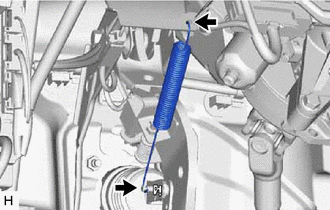
3. REMOVE BRAKE PEDAL RETURN SPRING
| (a) Remove the brake pedal return spring from the instrument panel reinforcement assembly and push rod pin. |
|
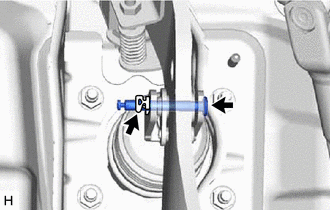
4. REMOVE PUSH ROD PIN
| (a) Remove the clip and push rod pin. |
|
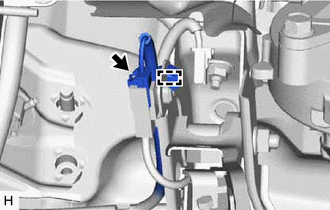
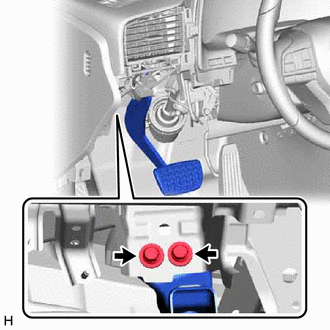
5. REMOVE BRAKE PEDAL SUPPORT ASSEMBLY
| (a) Disconnect the connector and disengage the clamp. |
|
| (b) Remove the 2 bolts and separate the brake pedal support assembly from the instrument panel reinforcement assembly. |
|
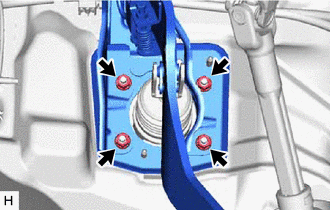
| (c) Remove the 4 nuts and brake pedal support assembly. |
|
 Components
COMPONENTS ILLUSTRATION *1 BRAKE PEDAL RETURN SPRING *2 BRAKE PEDAL SUPPORT ASSEMBLY *3 PUSH ROD PIN *4 STOP LIGHT SWITCH ASSEMBLY *5 BRAKE MASTER CYLINDER PUSH ROD CLEVIS ...
 Disassembly
DISASSEMBLY PROCEDURE 1. REMOVE BRAKE PEDAL SUB-ASSEMBLY (a) Disengage the 2 clamps. (b) Remove the bolt, nut and brake pedal sub-assembly from the brake pedal support sub-assembly. ...
Other materials:
Lexus RX (RX 350L, RX450h) 2016-2026 Repair Manual > Can Communication System: Steering Angle Sensor Communication Stop Mode
DESCRIPTION Detection Item Symptom Trouble Area Steering Angle Sensor Communication Stop Mode Either condition is met:
"Spiral cable (Steering Angle Sensor)" is not displayed on the CAN Bus Check screen of the Techstream.
Click here
Communication system DTCs (DTCs that start w ...
Lexus RX (RX 350L, RX450h) 2016-2026 Repair Manual > Audio And Visual System (for 12.3 Inch Display): Parts Location
PARTS LOCATION ILLUSTRATION *1 TELEPHONE MICROPHONE ASSEMBLY *2 ENGINE ROOM RELAY BLOCK AND JUNCTION BLOCK ASSEMBLY - AMP FUSE - ECU-IG1 NO. 8 FUSE - RADIO NO. 1 FUSE - RADIO NO. 2 FUSE *3 INSTRUMENT PANEL JUNCTION BLOCK ASSEMBLY - ECU-ACC FUSE - ECU-DCC NO. 2 FUSE - METER FUSE - MET ...
Lexus RX (RX 350L, RX450h) 2016-{YEAR} Owners Manual
- For your information
- Pictorial index
- For safety and security
- Instrument cluster
- Operation of each component
- Driving
- Lexus Display Audio system
- Interior features
- Maintenance and care
- When trouble arises
- Vehicle specifications
- For owners
Lexus RX (RX 350L, RX450h) 2016-{YEAR} Repair Manual

0.0094