
Lexus RX (RX 350L, RX450h) 2016-2026 Repair Manual: Installation
INSTALLATION
CAUTION / NOTICE / HINT
CAUTION:
The rear differential carrier assembly with differential support is very heavy. Be sure to follow the procedure described in the repair manual, or the engine lifter may suddenly drop.
NOTICE:
If installing a new rear differential carrier assembly, remove the 2 differential side seal caps before installing the rear drive shaft assembly.
PROCEDURE
1. TEMPORARILY INSTALL NO. 2 REAR DIFFERENTIAL SUPPORT
| (a) Temporarily install the No. 2 rear differential support to the rear differential carrier assembly with 2 new bolts and 2 new nuts. NOTICE:
HINT: The nuts have tabs to prevent them from rotating. |
|
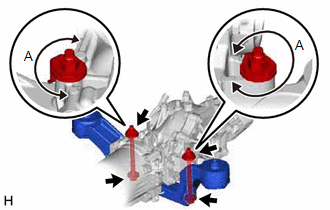
2. INSTALL UPPER REAR DIFFERENTIAL MOUNT STOPPER
.png)
(a) Install the 2 upper rear differential mount stoppers to the No. 2 rear differential support.
NOTICE:
Keep the upper rear differential mount stoppers free of oil and foreign matter.
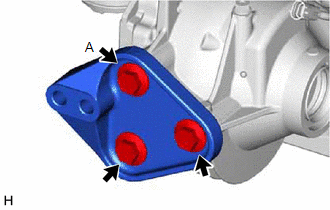
3. INSTALL DIFFERENTIAL SUPPORT
| (a) Install the differential support to the rear differential carrier assembly with 3 new bolts. Torque: 166.7 N·m {1700 kgf·cm, 123 ft·lbf} NOTICE: Tighten the bolt (A) shown in the illustration first. |
|
4. TEMPORARILY INSTALL REAR DIFFERENTIAL CARRIER ASSEMBLY WITH DIFFERENTIAL SUPPORT
NOTICE:
- Do not damage the contact surface when installing the rear differential carrier assembly with differential support.
- The remaining oil may leak out when installing the rear differential carrier assembly with differential support.
- Securely support the rear differential carrier assembly with differential support while performing this step to avoid excessively tilting or dropping the rear differential carrier assembly with differential support.
- Install the bolts and nuts with the rear differential carrier assembly with differential support secured.
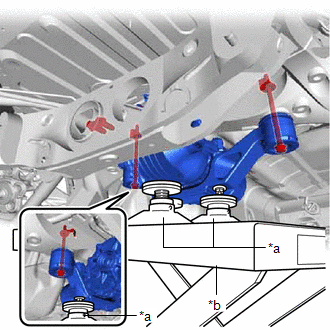
| (a) Support the rear differential carrier assembly with differential support with an engine lifter using 3 attachments or equivalent tools as shown in the illustration. HINT: Raise the rear differential carrier assembly with differential support until the vacuum hose can be installed. |
|
| (b) Install the vacuum hose to the clamp. NOTICE: Do not damage the vacuum hose and electro magnetic control coupling wire harness. |
|
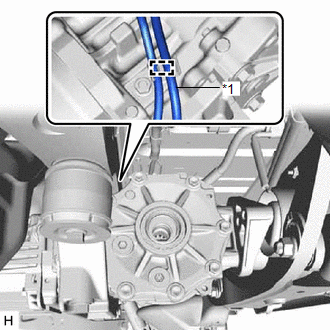
| (c) Install the vacuum hose to the clamp (B). |
|
.png)
(d) Connect the connector and engage the clamp (A).
| (e) Temporarily install the rear differential carrier assembly with differential support to the front side of the rear suspension member sub-assembly with the 2 lower rear differential mount stoppers, 2 new bolts and 2 new nuts. NOTICE: Keep the bolt and lower rear differential mount stoppers free of oil and foreign matter. HINT:
|
|
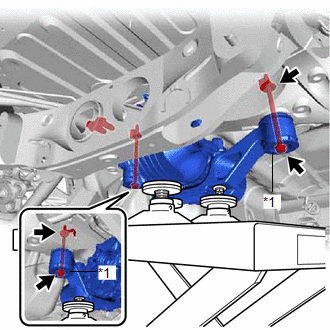
5. FULLY INSTALL REAR DIFFERENTIAL CARRIER ASSEMBLY WITH DIFFERENTIAL SUPPORT
NOTICE:
Do not tighten the bolts with the inner cylinder or rear differential mount cushion tilted.
| (a) Install the rear differential carrier assembly with differential support to the rear No. 2 differential mount cushion with the 2 new bolts. Torque: 95.1 N·m {970 kgf·cm, 70 ft·lbf} |
|
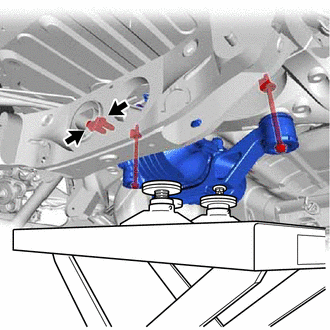
| (b) Tighten the 2 bolts. Torque: 86 N·m {877 kgf·cm, 63 ft·lbf} HINT:
|
|
.png)
| (c) Tighten the 2 bolts. Torque: 80 N·m {816 kgf·cm, 59 ft·lbf} |
|
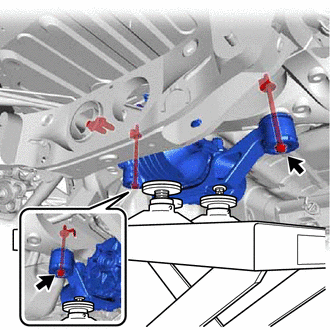
(d) Lower the engine lifter.
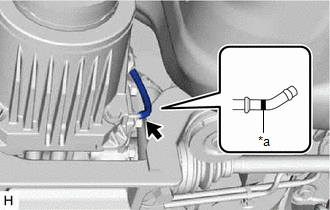
| (e) Connect the vacuum hose to the electro magnetic control coupling sub-assembly. NOTICE: Connect the vacuum hose until it reaches the paint mark. |
|
6. INSTALL REAR DIFFERENTIAL DRAIN PLUG
| (a) Using a 10 mm hexagon wrench, install a new gasket and the rear differential drain plug. Torque: 39 N·m {398 kgf·cm, 29 ft·lbf} |
|
.png)
7. INSTALL REAR STABILIZER BAR
w/o Rear No. 2 Seat: Click here .gif)
w/ Rear No. 2 Seat: Click here
8. INSTALL PROPELLER WITH CENTER BEARING SHAFT ASSEMBLY
Click here
HINT:
The inspection and adjustment of the joint angle is performed at the end of the installation procedure.
9. INSTALL REAR DRIVE SHAFT ASSEMBLY
(a) Install the rear drive shaft assembly LH and RH.
Click here
10. INSPECT AND ADJUST JOINT ANGLE
Click here
 Disassembly
DISASSEMBLY CAUTION / NOTICE / HINT NOTICE:
Before installation, thoroughly clean and dry each part and then apply Toyota Genuine Differential gear oil LT SAE 75W-85 GL-5 or equivalent to them.
D ...
 Reassembly
REASSEMBLY CAUTION / NOTICE / HINT NOTICE:
Before installation, thoroughly clean and dry each part and then apply Toyota Genuine Differential gear oil LT SAE 75W-85 GL-5 or equivalent to them.
Do ...
Other materials:
Lexus RX (RX 350L, RX450h) 2016-2026 Repair Manual > How To Troubleshoot Ecu Controlled Systems: How To Proceed With Troubleshooting
HOW TO PROCEED WITH TROUBLESHOOTING OPERATION FLOW HINT: Perform troubleshooting in accordance with the procedure below. The following is an outline of basic troubleshooting procedure. Confirm the troubleshooting procedure for the circuit you are working on before beginning troubleshooting. 1.VEHICL ...
Lexus RX (RX 350L, RX450h) 2016-2026 Repair Manual > Sfi System: Lost Communication with Instrument Panel Cluster (IPC) Control Module Missing Message (U015587)
DESCRIPTION The ECM and combination meter assembly send and receive signals via CAN communication. If a communication error occurs between the ECM and combination meter assembly, the ECM illuminates the MIL and stores this DTC. DTC No. Detection Item DTC Detection Condition Trouble Area M ...
Lexus RX (RX 350L, RX450h) 2016-{YEAR} Owners Manual
- For your information
- Pictorial index
- For safety and security
- Instrument cluster
- Operation of each component
- Driving
- Lexus Display Audio system
- Interior features
- Maintenance and care
- When trouble arises
- Vehicle specifications
- For owners
Lexus RX (RX 350L, RX450h) 2016-{YEAR} Repair Manual

0.0116