
Lexus RX (RX 350L, RX450h) 2016-2026 Repair Manual: Inspection
INSPECTION
PROCEDURE
1. INSPECT PRELOAD
| (a) Secure the steering column assembly in a vise using aluminum plates, cloths and wooden blocks. NOTICE:
|
|
.png)
| (b) Install 2 service nuts to the steering main shaft. Recommended Service Nut: Thread Diameter 12.0 mm (0.472 in.) Thread Pitch 1.25 mm (0.0492 in.) |
|
.png)
(c) Simultaneously rotate the service nut that was installed first counterclockwise and rotate the service nut that was installed second clockwise to lock them.
NOTICE:
Do not apply excessive torque to the service nuts by using a tool such as an impact wrench.
HINT:
The service nuts are used for turning the steering main shaft during inspection of the steering main shaft rotating torque.
Remove the service nuts after performing this inspection.
| (d) Using a torque wrench, turn the steering main shaft at a constant rate of approximately 1 revolution every 4 seconds and measure the preload. Preload: 1.3 to 2.7 N*m (13.3 to 27.5 kgf*cm, 11.6 to 23.8 in.*lbf) If the preload is not as specified, replace the power steering ECU assembly or electric power steering column sub-assembly with a new one. |
|
.png)
(e) Remove the 2 service nuts.
2. INSPECT STEERING COLUMN ASSEMBLY
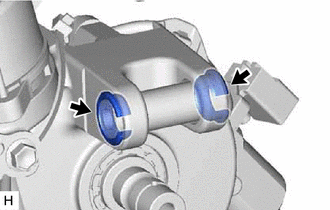
| (a) Check that the 2 bushings are securely installed to the steering column assembly. If the bushings are deformed, missing or damaged, replace the electric power steering column sub-assembly with a new one. |
|
 Disassembly
DISASSEMBLY CAUTION / NOTICE / HINT NOTICE:
Do not drop the power steering ECU assembly, strike it with tools or subject it to impacts.
If the power steering ECU assembly is subjected to an impac ...
 Installation
INSTALLATION PROCEDURE 1. ALIGN FRONT WHEELS FACING STRAIGHT AHEAD 2. INSTALL STEERING COLUMN ASSEMBLY NOTICE: Make sure that the wire harness is not interfering with the steering column assembly. (a) ...
Other materials:
Lexus RX (RX 350L, RX450h) 2016-2026 Repair Manual > Lane Control System: Terminals Of Ecu
TERMINALS OF ECU CHECK FORWARD RECOGNITION CAMERA NOTICE:
DTCs may be output when connectors are disconnected during inspection. Therefore, be sure to clear the DTCs using the Techstream once the inspection has been completed.
Do not apply excessive force to the forward recognition camera conn ...
Lexus RX (RX 350L, RX450h) 2016-2026 Repair Manual > Washer Motor: Inspection
INSPECTION PROCEDURE 1. INSPECT WASHER MOTOR AND PUMP ASSEMBLY (a) for Front Washer: (1) Remove the washer jar. (2) Disconnect the washer motor and pump assembly connector. HINT: This check should be performed with the washer motor and pump assembly installed on the washer jar. (3) Fill the washe ...
Lexus RX (RX 350L, RX450h) 2016-{YEAR} Owners Manual
- For your information
- Pictorial index
- For safety and security
- Instrument cluster
- Operation of each component
- Driving
- Lexus Display Audio system
- Interior features
- Maintenance and care
- When trouble arises
- Vehicle specifications
- For owners
Lexus RX (RX 350L, RX450h) 2016-{YEAR} Repair Manual

0.0121