
Lexus RX (RX 350L, RX450h) 2016-2026 Repair Manual: CD/DVD Sound Skips
CAUTION / NOTICE / HINT
NOTICE:
Depending on the parts that are replaced during vehicle inspection or maintenance, performing initialization, registration or calibration may be needed. Refer to Precaution for Audio and Visual System.
Click here .gif)
PROCEDURE
| 1. | CHECK DISC |
| (a) Check that the disc is not deformed or cracked. OK: No deformation or cracks on the disc |
|
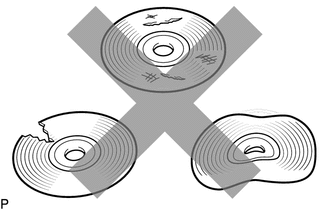
| NG | .gif) | END (DISC IS FAULTY) |
|
.gif)
| 2. | CHECK DISC |
| (a) Check the disc. OK: The disc is clean. NOTICE: Do not use a conventional record cleaner or anti-static preservative. HINT: If dirt is on the disc surface, wipe it clean with a soft cloth from the inside to the outside in a radial direction. |
|
.png)
| NG | | CLEAN DISC |
|
| 3. | REPLACE DISC AND RECHECK |
(a) Replace the disc with a new or known good one and check that the malfunction disappears.
OK:
Malfunction disappears.
| OK | | END (DISC WAS FAULTY) |
|
| 4. | CHECK RADIO RECEIVER ASSEMBLY |
(a) Check the radio receiver assembly installation condition.
(1) Check that the radio receiver assembly is properly installed.
OK:
The radio receiver assembly is properly installed.
| OK | | REPLACE RADIO RECEIVER ASSEMBLY |
| NG | | REINSTALL RADIO RECEIVER ASSEMBLY |
 Disc cannot be Ejected
CAUTION / NOTICE / HINT NOTICE: Depending on the parts that are replaced during vehicle inspection or maintenance, performing initialization, registration or calibration may be needed. Refer to Precau ...
 Radio Broadcast cannot be Received or Poor Reception
CAUTION / NOTICE / HINT NOTICE: Depending on the parts that are replaced during vehicle inspection or maintenance, performing initialization, registration or calibration may be needed. Refer to Precau ...
Other materials:
Lexus RX (RX 350L, RX450h) 2016-2026 Repair Manual > Seat: Seat Heater Control(for Front Side)
ComponentsCOMPONENTS ILLUSTRATION *1 SEAT HEATER CONTROL SUB-ASSEMBLY - - RemovalREMOVAL CAUTION / NOTICE / HINT The necessary procedures (adjustment, calibration, initialization or registration) that must be performed after parts are removed and installed, or replaced during seat heate ...
Lexus RX (RX 350L, RX450h) 2016-2026 Repair Manual > Back Door Closer Ecu: Installation
INSTALLATION PROCEDURE 1. INSTALL MULTIPLEX NETWORK DOOR ECU (a) Engage the 2 guides to install the multiplex network door ECU with the 2 bolts. Torque: 5.5 N·m {56 kgf·cm, 49 in·lbf} (b) Connect the 2 connectors. 2. INSTALL BACK DOOR TRIM PANEL ASSEMBLY (w/o Rear No. 2 Seat) Click here 3. IN ...
Lexus RX (RX 350L, RX450h) 2016-{YEAR} Owners Manual
- For your information
- Pictorial index
- For safety and security
- Instrument cluster
- Operation of each component
- Driving
- Lexus Display Audio system
- Interior features
- Maintenance and care
- When trouble arises
- Vehicle specifications
- For owners
Lexus RX (RX 350L, RX450h) 2016-{YEAR} Repair Manual

0.0113