
Lexus RX (RX 350L, RX450h) 2016-2026 Repair Manual: Removal
REMOVAL
CAUTION / NOTICE / HINT
The necessary procedures (adjustment, calibration, initialization, or registration) that must be performed after parts are removed, installed, or replaced during the steering pad switch assembly removal/installation are shown below.
Necessary Procedure After Parts Removed/Installed/Replaced| Replacement Part or Procedure | Necessary Procedures | Effects / Inoperative when not performed | Link |
|---|---|---|---|
|
*1: When performing learning using the Techstream.
Click here | |||
| Disconnect cable from negative battery terminal | Memorize steering angle neutral point | Lane Control System | |
| Pre-collision system | |||
| Intelligent clearance sonar system*1 | |||
| Lighting system (w/ Automatic Headlight Beam Level Control System) | | ||
| Parking assist monitor system | | ||
| Panoramic view monitor system | | ||
| Initialize back door lock | Power door lock control system | | |
| Reset back door close position | Power Back Door System (w/ Outside Door Control Switch) | | |
PROCEDURE
1. REMOVE HORN BUTTON ASSEMBLY
Click here .gif)
2. REMOVE STEERING PAD SWITCH ASSEMBLY
| (a) Disconnect the steering pad switch connector from the spiral cable with sensor sub-assembly. |
|
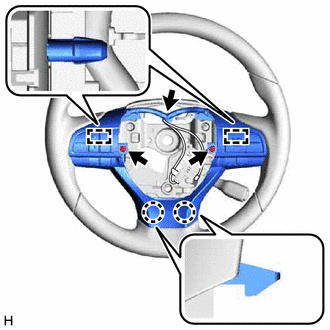
(b) Remove the 2 screws.
(c) Disengage the 2 claws and 2 pins to remove the steering pad switch assembly.
 Installation
INSTALLATION PROCEDURE 1. INSTALL STEERING PAD SWITCH ASSEMBLY (a) Engage the 2 claws and 2 pins to install the steering pad switch assembly. (b) Install the 2 screws. Torque: 2.4 N·m {24 kgf·cm, 2 ...
 Steering System
...
Other materials:
Lexus RX (RX 350L, RX450h) 2016-2026 Repair Manual > Sfi System: Evaporative Emission System Leak Detected (Large Leak) (P045500,P045600)
DTC SUMMARY DTC No. Detection Item DTC Detection Condition Trouble Area MIL Memory Note P045500 Evaporative Emission System Leak Detected (Large Leak) Leak detection pump creates negative pressure (vacuum) in EVAP system and EVAP system pressure is measured. Reference pressure ...
Lexus RX (RX 350L, RX450h) 2016-2026 Repair Manual > Can Communication System: Lost Communication with "Seat Control Module A" (U0208)
DESCRIPTION DTC No. Detection Item DTC Detection Condition Trouble Area Note U0208 Lost Communication with "Seat Control Module A" No communication from the position control ECU and switch assembly LH continues.
Position control ECU and switch assembly LH branch line or conne ...
Lexus RX (RX 350L, RX450h) 2016-{YEAR} Owners Manual
- For your information
- Pictorial index
- For safety and security
- Instrument cluster
- Operation of each component
- Driving
- Lexus Display Audio system
- Interior features
- Maintenance and care
- When trouble arises
- Vehicle specifications
- For owners
Lexus RX (RX 350L, RX450h) 2016-{YEAR} Repair Manual

0.0092