
Lexus RX (RX 350L, RX450h) 2016-2026 Repair Manual: Removal
REMOVAL
CAUTION / NOTICE / HINT
The necessary procedures (adjustment, calibration, initialization, or registration) that must be performed after parts are removed and installed, or replaced during back door closer ECU removal/installation are shown below.
Necessary Procedure After Parts Removed/Installed/Replaced| Replaced Part or Performed Procedure | Necessary Procedure | Effect/Inoperative Function when Necessary Procedure not Performed | Link |
|---|---|---|---|
| Multiplex network door ECU | Reset Back Door Close Position | Power Back Door System (w/ Outside Door Control Switch) | |
CAUTION / NOTICE / HINT
NOTICE:
When replacing the multiplex network door ECU, the back door automatic open stop position (memory stopped position) must be registered, so be sure to make a note of the automatic open stop position.
PROCEDURE
1. REMOVE BACK WINDOW UPPER PANEL TRIM (w/o Rear No. 2 Seat)
Click here .gif)
2. REMOVE BACK WINDOW UPPER PANEL TRIM (w/ Rear No. 2 Seat)
Click here
3. REMOVE BACK DOOR TRIM COVER LH (w/o Rear No. 2 Seat)
Click here
4. REMOVE BACK DOOR TRIM COVER LH (w/ Rear No. 2 Seat)
Click here
5. REMOVE BACK DOOR TRIM COVER RH
HINT:
Use the same procedure as for the LH side.
6. REMOVE BACK DOOR LOCK COVER (w/o Rear No. 2 Seat)
Click here
7. REMOVE BACK DOOR LOCK COVER (w/ Rear No. 2 Seat)
Click here
8. REMOVE BACK DOOR TRIM BASE
Click here
9. REMOVE DOOR PULL HANDLE
Click here
10. REMOVE NO. 1 LUGGAGE COMPARTMENT LIGHT ASSEMBLY
Click here
11. REMOVE BACK DOOR TRIM PANEL ASSEMBLY (w/o Rear No. 2 Seat)
Click here
12. REMOVE BACK DOOR TRIM PANEL ASSEMBLY (w/ Rear No. 2 Seat)
Click here
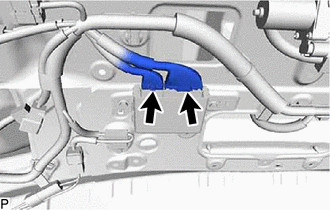
13. REMOVE MULTIPLEX NETWORK DOOR ECU
| (a) Disconnect the 2 connectors. |
|
| (b) Remove the 2 bolts. |
|
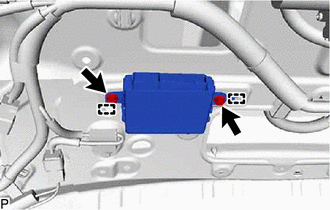
(c) Disengage the 2 guides to remove the multiplex network door ECU.
 Installation
INSTALLATION PROCEDURE 1. INSTALL MULTIPLEX NETWORK DOOR ECU (a) Engage the 2 guides to install the multiplex network door ECU with the 2 bolts. Torque: 5.5 N·m {56 kgf·cm, 49 in·lbf} (b) Connect ...
 Back Door Opener Switch
ComponentsCOMPONENTS ILLUSTRATION *1 BACK DOOR OPENER SWITCH ASSEMBLY *2 BACK DOOR OUTSIDE GARNISH SUB-ASSEMBLY InspectionINSPECTION PROCEDURE 1. INSPECT BACK DOOR OPENER SWITCH ASSEMBLY ...
Other materials:
Lexus RX (RX 350L, RX450h) 2016-2026 Repair Manual > Navigation System: Precaution
PRECAUTION PRECAUTION FOR DISCONNECTING CABLE FROM NEGATIVE BATTERY TERMINAL NOTICE:
After the engine switch is turned off, the radio receiver assembly records various types of memory and settings. As a result, after turning the engine switch off, make sure to wait at least 120 seconds before dis ...
Lexus RX (RX 350L, RX450h) 2016-2026 Repair Manual > Rear No. 1 Seat Assembly (for 60/40 Split Seat Type Lh Side): Installation
INSTALLATION CAUTION / NOTICE / HINT CAUTION: Wear protective gloves. Sharp areas on the seat frame may injure your hands. PROCEDURE 1. INSTALL REAR NO. 1 SEAT ASSEMBLY LH (a) Place the rear No. 1 seat assembly LH in the cabin. NOTICE: Be careful not to damage the rear No. 1 seat assembly LH, vehicl ...
Lexus RX (RX 350L, RX450h) 2016-{YEAR} Owners Manual
- For your information
- Pictorial index
- For safety and security
- Instrument cluster
- Operation of each component
- Driving
- Lexus Display Audio system
- Interior features
- Maintenance and care
- When trouble arises
- Vehicle specifications
- For owners
Lexus RX (RX 350L, RX450h) 2016-{YEAR} Repair Manual

0.0086