
Lexus RX (RX 350L, RX450h) 2016-2026 Repair Manual: Back Door Opener Switch
Components
COMPONENTS
ILLUSTRATION
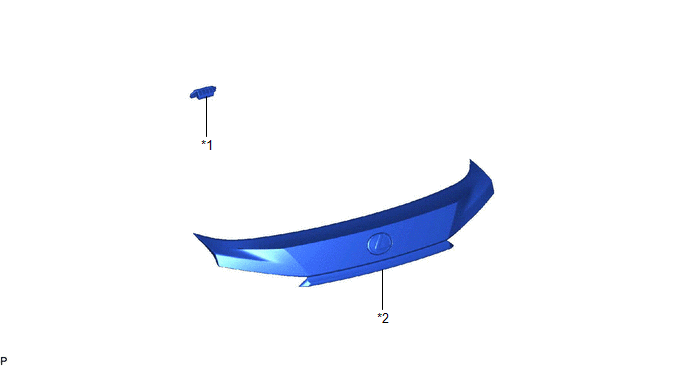
| *1 | BACK DOOR OPENER SWITCH ASSEMBLY | *2 | BACK DOOR OUTSIDE GARNISH SUB-ASSEMBLY |
Inspection
INSPECTION
PROCEDURE
1. INSPECT BACK DOOR OPENER SWITCH ASSEMBLY
(a) Check the operation of the opener switch.
| (1) Measure the resistance according to the value(s) in the table below. Standard Resistance:
If the result is not as specified, replace the back door opener switch assembly. |
|
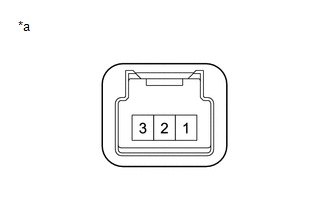
(b) Check the operation of the lock switch.
(1) Measure the resistance according to the value(s) in the table below.
Standard Resistance:
| Tester Connection | Condition | Specified Condition |
|---|---|---|
| 1 - 2 | Back door lock switch not pushed | 10 kΩ or higher |
| 1 - 2 | Back door lock switch pushed | Below 1 Ω |
If the result is not as specified, replace the back door opener switch assembly.
Removal
REMOVAL
PROCEDURE
1. REMOVE BACK DOOR OUTSIDE GARNISH SUB-ASSEMBLY
Click here .gif)
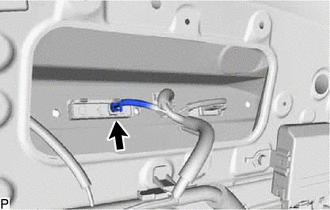
2. REMOVE BACK DOOR OPENER SWITCH ASSEMBLY
| (a) Disconnect the connector. |
|
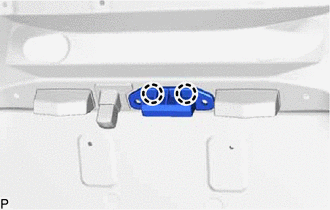
| (b) Disengage the 2 claws to remove the back door opener switch assembly. |
|
Installation
INSTALLATION
PROCEDURE
1. INSTALL BACK DOOR OPENER SWITCH ASSEMBLY
(a) Engage the 2 claws to install the back door opener switch assembly.
(b) Connect the connector.
2. INSTALL BACK DOOR OUTSIDE GARNISH SUB-ASSEMBLY
Click here .gif)
 Removal
REMOVAL CAUTION / NOTICE / HINT The necessary procedures (adjustment, calibration, initialization, or registration) that must be performed after parts are removed and installed, or replaced during bac ...
 Back Door Weatherstrip
ComponentsCOMPONENTS ILLUSTRATION *1 BACK DOOR WEATHERSTRIP - - ● Non-reusable part - - RemovalREMOVAL PROCEDURE 1. REMOVE BACK DOOR WEATHERSTRIP (a) Remove the back door w ...
Other materials:
Lexus RX (RX 350L, RX450h) 2016-2026 Repair Manual > Power Mirror Control System (w/ Memory): AUTO Power Retract Mirrors do not operate
DESCRIPTION The multiplex network master switch assembly sends the auto retractable outer mirror switch signal to the main body ECU (multiplex network body ECU) via LIN communication. The main body ECU (multiplex network body ECU) sends the auto retract/return signal to the outer mirror control ECU ...
Lexus RX (RX 350L, RX450h) 2016-2026 Repair Manual > Can Communication System: Check Bus 2 Line for Short to +B
DESCRIPTION There may be a short circuit between one of the CAN bus lines and +B when no resistance exists between terminal 18 (CA4H) of the network gateway ECU and terminal 16 (BAT) of the DLC3, or terminal 17 (CA4L) of the network gateway ECU and terminal 16 (BAT) of the DLC3. Symptom Trouble ...
Lexus RX (RX 350L, RX450h) 2016-{YEAR} Owners Manual
- For your information
- Pictorial index
- For safety and security
- Instrument cluster
- Operation of each component
- Driving
- Lexus Display Audio system
- Interior features
- Maintenance and care
- When trouble arises
- Vehicle specifications
- For owners
Lexus RX (RX 350L, RX450h) 2016-{YEAR} Repair Manual

0.0102