
Lexus RX (RX 350L, RX450h) 2016-2026 Repair Manual: Back Door Weatherstrip
Components
COMPONENTS
ILLUSTRATION
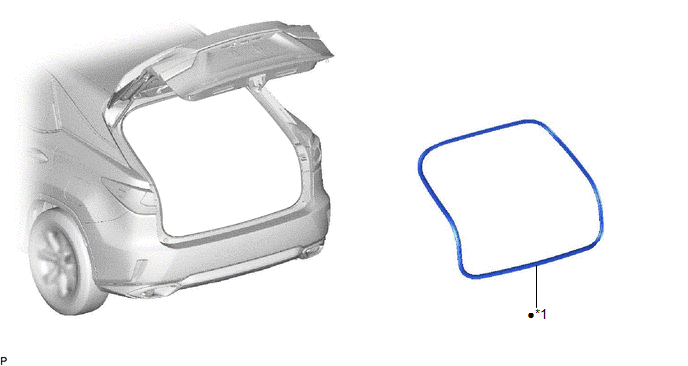
| *1 | BACK DOOR WEATHERSTRIP | - | - |
| ● | Non-reusable part | - | - |
Removal
REMOVAL
PROCEDURE
1. REMOVE BACK DOOR WEATHERSTRIP
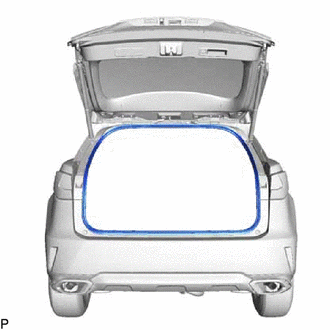
| (a) Remove the back door weatherstrip. |
|
Installation
INSTALLATION
PROCEDURE
1. INSTALL BACK DOOR WEATHERSTRIP (w/o Rear No. 2 Seat)
(a) Clean the vehicle body.
(b) Align the joint of a new back door weatherstrip with the back door lock striker and temporarily install the back door weatherstrip.
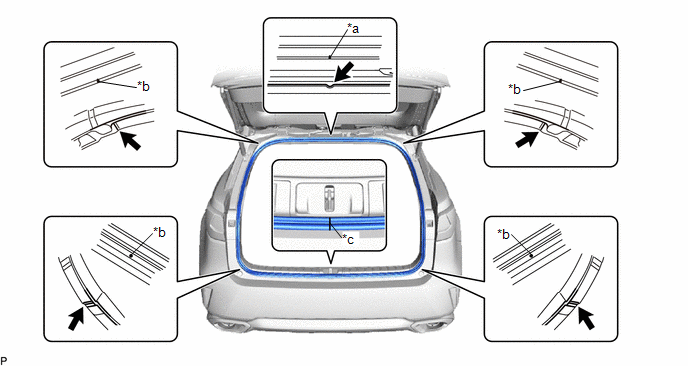
| *a | Alignment mark (White) | *b | Alignment mark (Pink) |
| *c | Joint | - | - |
.png) | Flange Position | - | - |
(c) Align the alignment marks on the back door weatherstrip with the flanges on the vehicle body indicated by the arrows, and install the back door weatherstrip.
NOTICE:
After installation, check that the corners fit correctly.
2. INSTALL BACK DOOR WEATHERSTRIP (w/ Rear No. 2 Seat)
(a) Clean the vehicle body.
(b) Align the joint of a new back door weatherstrip with the back door lock striker and temporarily install the back door weatherstrip.
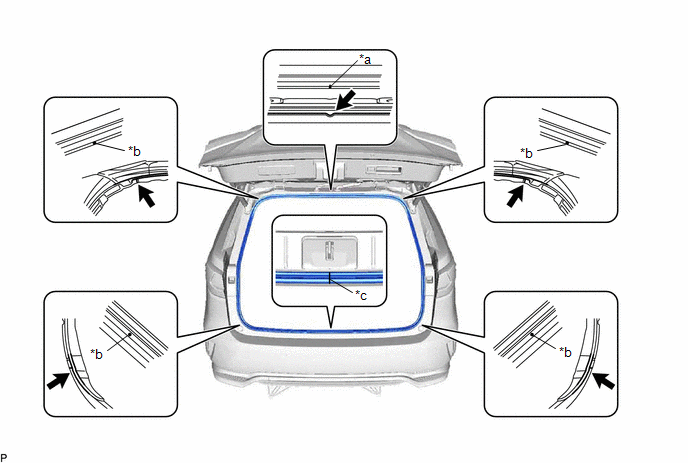
| *a | Alignment mark (Green) | *b | Alignment mark (Pink) |
| *c | Joint | - | - |
| | Flange Position | - | - |
(c) Align the alignment marks on the back door weatherstrip with the flanges on the vehicle body indicated by the arrows, and install the back door weatherstrip.
NOTICE:
After installation, check that the corners fit correctly.
 Back Door Opener Switch
ComponentsCOMPONENTS ILLUSTRATION *1 BACK DOOR OPENER SWITCH ASSEMBLY *2 BACK DOOR OUTSIDE GARNISH SUB-ASSEMBLY InspectionINSPECTION PROCEDURE 1. INSPECT BACK DOOR OPENER SWITCH ASSEMBLY ...
 Front Door
...
Other materials:
Lexus RX (RX 350L, RX450h) 2016-2026 Repair Manual > Rocker Panel Moulding: Components
COMPONENTS ILLUSTRATION *1 BODY ROCKER PANEL MOULDING ASSEMBLY *2 FRONT FENDER MOULDING SUB-ASSEMBLY *3 NO. 6 ROCKER PANEL MOULDING PROTECTOR *4 QUARTER OUTSIDE MOULDING SUB-ASSEMBLY *5 QUARTER PANEL WHEEL OPENING MOULDING *6 ROCKER PANEL MOULDING COVER ● Non-re ...
Lexus RX (RX 350L, RX450h) 2016-2026 Repair Manual > Navigation System: "No GPS signal" mark is displayed
CAUTION / NOTICE / HINT NOTICE: Depending on the parts that are replaced during vehicle inspection or maintenance, performing initialization, registration or calibration may be needed. Refer to Precaution for Navigation System. Click here PROCEDURE 1. CHECK CABIN (a) Check the cabin for a ...
Lexus RX (RX 350L, RX450h) 2016-{YEAR} Owners Manual
- For your information
- Pictorial index
- For safety and security
- Instrument cluster
- Operation of each component
- Driving
- Lexus Display Audio system
- Interior features
- Maintenance and care
- When trouble arises
- Vehicle specifications
- For owners
Lexus RX (RX 350L, RX450h) 2016-{YEAR} Repair Manual

0.01