
Lexus RX (RX 350L, RX450h) 2016-2026 Repair Manual: Power Back Door Closer Switch
Components
COMPONENTS
ILLUSTRATION
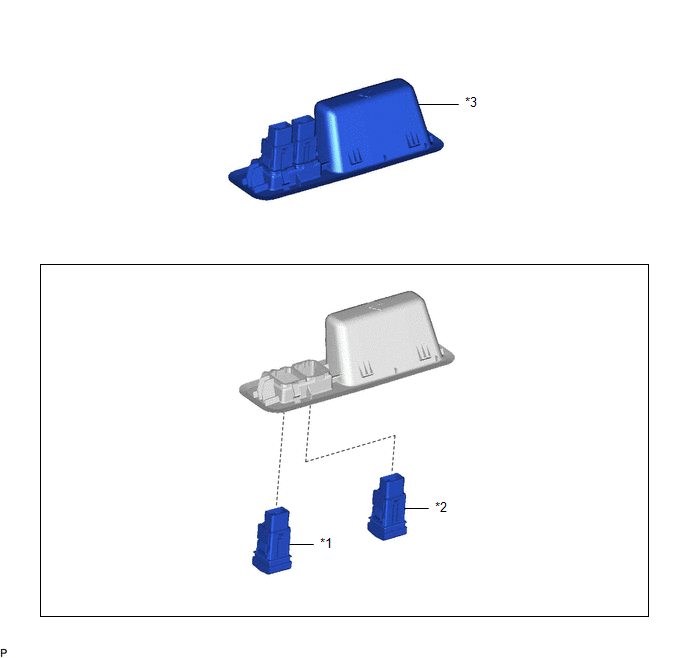
| *1 | BACK DOOR CONTROL SWITCH | *2 | DOOR CONTROL SWITCH |
| *3 | DOOR PULL HANDLE | - | - |
Removal
REMOVAL
PROCEDURE
1. REMOVE DOOR PULL HANDLE
Click here .gif)
2. REMOVE BACK DOOR CONTROL SWITCH
(a) Disengage the 2 claws to remove the back door control switch as shown in the illustration.
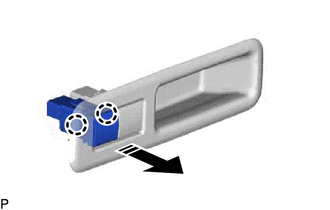
.png) | Remove in this Direction |
3. REMOVE DOOR CONTROL SWITCH
(a) Disengage the 2 claws to remove the door control switch as shown in the illustration.
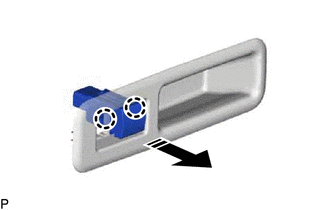
| | Remove in this Direction |
Inspection
INSPECTION
PROCEDURE
1. INSPECT BACK DOOR CONTROL SWITCH
(a) Check the switch.
| (1) Measure the resistance according to the value(s) in the table below. Standard Resistance:
If the result is not as specified, replace the back door control switch. |
|
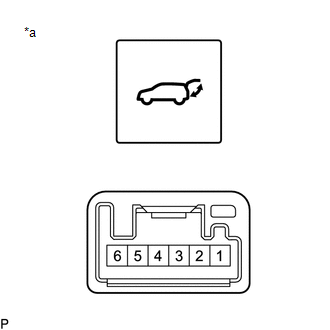
(b) Check that the switch illuminates.
(1) Apply battery voltage to the switch connector and check that the back door control switch illuminates.
OK:
| Battery Connection | Specified Condition |
|---|---|
| Battery positive (+) → Terminal 6 Battery negative (-) → Terminal 1 | Illumination illuminates |
If the result is not as specified, replace the back door control switch.
2. INSPECT DOOR CONTROL SWITCH
(a) Check the switch.
| (1) Measure the resistance according to the value(s) in the table below. Standard Resistance:
If the result is not as specified, replace the door control switch. |
|
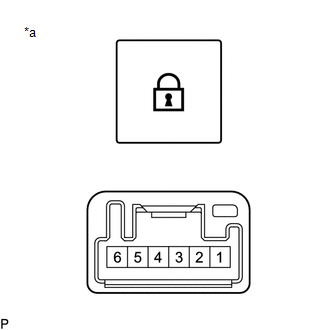
(b) Check the switch illumination.
(1) Apply battery voltage to the switch connector and check that the door control switch illuminates.
OK:
| Battery Connection | Specified Condition |
|---|---|
| Battery positive (+) → Terminal 6 Battery negative (-) → Terminal 1 | Illumination illuminates |
If the result is not as specified, replace the door control switch.
Installation
INSTALLATION
PROCEDURE
1. INSTALL DOOR CONTROL SWITCH
(a) Engage the 2 claws to install the door control switch as shown in the illustration.
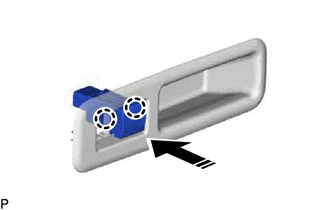
.png) | Install in this Direction |
2. INSTALL BACK DOOR CONTROL SWITCH
(a) Engage the 2 claws to install the back door control switch as shown in the illustration.
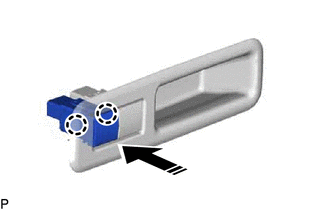
| | Install in this Direction |
3. INSTALL DOOR PULL HANDLE
Click here .gif)
 Installation
INSTALLATION PROCEDURE 1. PRECAUTION NOTICE: After turning the engine switch off, waiting time may be required before disconnecting the cable from the negative (-) battery terminal. Therefore, make su ...

Other materials:
Lexus RX (RX 350L, RX450h) 2016-2026 Repair Manual > Solar Sensor: Removal
REMOVAL CAUTION / NOTICE / HINT The necessary procedures (adjustment, calibration, initialization or registration) that must be performed after parts are removed and installed, or replaced during solar sensor removal/installation are shown below. Necessary Procedure After Parts Removed/Installed/Rep ...
Lexus RX (RX 350L, RX450h) 2016-2026 Repair Manual > Sfi System: Registration
REGISTRATION CAUTION / NOTICE / HINT PROCEDURE 1. VIN (VEHICLE IDENTIFICATION NUMBER) NOTICE: The Vehicle Identification Number (VIN) must be written to a replacement ECM. HINT: The VIN is a 17-digit alphanumeric vehicle identification number. The Techstream is required to register the VIN. (a) DESC ...
Lexus RX (RX 350L, RX450h) 2016-{YEAR} Owners Manual
- For your information
- Pictorial index
- For safety and security
- Instrument cluster
- Operation of each component
- Driving
- Lexus Display Audio system
- Interior features
- Maintenance and care
- When trouble arises
- Vehicle specifications
- For owners
Lexus RX (RX 350L, RX450h) 2016-{YEAR} Repair Manual

0.0114