
Lexus RX (RX 350L, RX450h) 2016-2026 Repair Manual: Open or Short in Steering Angle Sensor +B (C1625)
DESCRIPTION
This DTC is stored if the clearance warning ECU assembly receives a signal via CAN communication from the steering sensor that indicates a power supply problem.
| DTC No. | Detection Item | DTC Detection Condition | Trouble Area |
|---|---|---|---|
| C1625 | Open or Short in Steering Angle Sensor +B | Open or short in steering sensor power source |
|
WIRING DIAGRAM
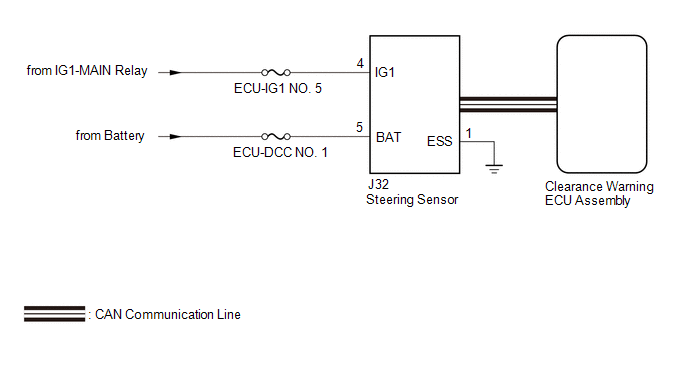
CAUTION / NOTICE / HINT
NOTICE:
-
After turning the engine switch off, waiting time may be required before disconnecting the cable from the negative (-) battery terminal. Therefore make sure to read the disconnecting the cable from the negative (-) battery terminal notices before proceeding with work.
Click here
.gif)
-
After replacing an ultrasonic sensor or the clearance warning ECU assembly, perform the necessary procedures (adjustment, calibration, initialization or registration).
Click here
- Inspect the fuses for circuits related to this system before performing the following procedure.
PROCEDURE
| 1. | CHECK HARNESS AND CONNECTOR (STEERING SENSOR POWER SOURCE) |
(a) Disconnect the J32 steering sensor connector.
(b) Measure the voltage according to the value(s) in the table below.
Standard Voltage:
| Tester Connection | Condition | Specified Condition |
|---|---|---|
| J32-4 (IG1) - J32-1 (ESS) | Engine switch on (IG) | 11 to 14 V |
| NG |  | REPAIR OR REPLACE HARNESS OR CONNECTOR |
|

| 2. | CHECK HARNESS AND CONNECTOR (STEERING SENSOR POWER SOURCE) |
(a) Measure the resistance according to the value(s) in the table below.
Standard Resistance:
| Tester Connection | Condition | Specified Condition |
|---|---|---|
| J32-1 (ESS) - Body ground | Always | Below 1 Ω |
(b) Measure the voltage according to the value(s) in the table below.
Standard Voltage:
| Tester Connection | Condition | Specified Condition |
|---|---|---|
| J32-5 (BAT) - J32-1 (ESS) | Always | 11 to 14 V |
| OK | | REPLACE STEERING SENSOR |
| NG | | REPAIR OR REPLACE HARNESS OR CONNECTOR |
 ECU Malfunction (C1611)
DESCRIPTION If the clearance warning ECU assembly detects an internal malfunction during self-diagnosis, DTC C1611 is stored. DTC No. Detection Item DTC Detection Condition Trouble Area C ...
 Steering Angle Sensor Failure (C1626)
DESCRIPTION This DTC is stored if the clearance warning ECU assembly receives a signal via CAN communication from the steering sensor that indicates an internal malfunction. DTC No. Detection Ite ...
Other materials:
Lexus RX (RX 350L, RX450h) 2016-2026 Repair Manual > Heated Steering Wheel System: System Description
SYSTEM DESCRIPTION HEATED STEERING WHEEL SYSTEM (a) The heated steering wheel system heats the steering wheel assembly when the steering heater switch (Integration control and panel assembly) is operated. (b) The heated steering wheel system uses a thermistor inside of the steering wheel assembly to ...
Lexus RX (RX 350L, RX450h) 2016-2026 Repair Manual > Rear Door Outside Moulding: Installation
INSTALLATION CAUTION / NOTICE / HINT HINT:
Use the same procedure for the RH side and LH side.
The following procedure is for the LH side.
PROCEDURE 1. INSTALL NO. 3 REAR DOOR WEATHERSTRIP (a) Engage the 7 clips to install the No. 3 rear door weatherstrip. 2. INSTALL REAR DOOR LOWER OUTSIDE ...
Lexus RX (RX 350L, RX450h) 2016-{YEAR} Owners Manual
- For your information
- Pictorial index
- For safety and security
- Instrument cluster
- Operation of each component
- Driving
- Lexus Display Audio system
- Interior features
- Maintenance and care
- When trouble arises
- Vehicle specifications
- For owners
Lexus RX (RX 350L, RX450h) 2016-{YEAR} Repair Manual

0.022