
Lexus RX (RX 350L, RX450h) 2016-2026 Repair Manual: Reassembly
REASSEMBLY
PROCEDURE
1. INSTALL FRONT OIL PUMP OIL SEAL
| (a) Using SST and a hammer, install a new front oil pump oil seal to the front oil pump body sub-assembly. SST: 09350-32014 09351-32140 Standard Depth: -0.2 to 0.2 mm (-0.00787 to 0.00787 in.) |
|
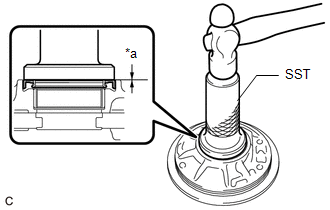
(b) Coat the lip of the front oil pump oil seal with MP grease.
2. INSTALL FRONT OIL PUMP BODY O-RING
| (a) Coat a new front oil pump body O-ring with ATF and install it to the front oil pump body sub-assembly. NOTICE: Ensure that the front oil pump body O-ring is not twisted. |
|
.png)
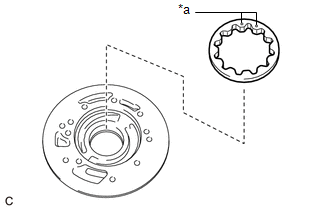
3. INSTALL FRONT OIL PUMP DRIVEN GEAR
| (a) Coat the front oil pump driven gear with ATF and install it to the front oil pump body sub-assembly with the marked side facing upward. |
|
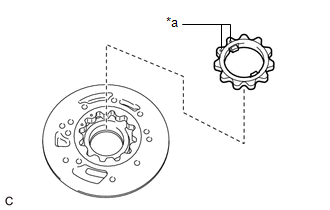
4. INSTALL FRONT OIL PUMP DRIVE GEAR
| (a) Coat the front oil pump drive gear with ATF and install it to the front oil pump body sub-assembly with the marked side facing upward. |
|
5. INSTALL STATOR SHAFT ASSEMBLY
| (a) Using a T30 "TORX" socket wrench, install the stator shaft assembly to the front oil pump body and gear sub-assembly with the 10 bolts. Torque: 9.8 N·m {100 kgf·cm, 87 in·lbf} |
|
.png)
6. INSTALL VALVE BODY OIL STRAINER ASSEMBLY
| (a) Using a T30 "TORX" socket wrench, install a new valve body oil strainer assembly to the stator shaft assembly with the 2 bolts. Torque: 5.4 N·m {55 kgf·cm, 48 in·lbf} |
|
.png)
7. INSTALL CLUTCH DRUM OIL SEAL RING
| (a) Coat 4 new clutch drum oil seal rings with ATF and install them to the stator shaft assembly. |
|
.png)
8. INSPECT FRONT OIL PUMP BODY SUB-ASSEMBLY
Click here .gif)
 Inspection
INSPECTION PROCEDURE 1. INSPECT FRONT OIL PUMP BODY SUB-ASSEMBLY (a) Turn the front oil pump drive gear with 2 screwdrivers and check that it rotates smoothly. NOTICE: Be careful not to damage the ...

Other materials:
Lexus RX (RX 350L, RX450h) 2016-2026 Repair Manual > Wiper And Washer System: Diagnostic Trouble Code Chart
DIAGNOSTIC TROUBLE CODE CHART Wiper and Washer System DTC No. Detection Item DTC Detection Condition Link B1245 Lost Communication with Wiper ECU LIN When the battery voltage is 9.5 V or more, a communication malfunction between the main body ECU (multiplex network body ECU) and win ...
Lexus RX (RX 350L, RX450h) 2016-2026 Repair Manual > Headup Display System: Problem Symptoms Table
PROBLEM SYMPTOMS TABLE HINT:
Use the table below to help determine the cause of problem symptoms. If multiple suspected areas are listed, the potential causes of the symptom are listed in order of probability in the "Suspected Area" column of the table. Check each symptom by checking the suspecte ...
Lexus RX (RX 350L, RX450h) 2016-{YEAR} Owners Manual
- For your information
- Pictorial index
- For safety and security
- Instrument cluster
- Operation of each component
- Driving
- Lexus Display Audio system
- Interior features
- Maintenance and care
- When trouble arises
- Vehicle specifications
- For owners
Lexus RX (RX 350L, RX450h) 2016-{YEAR} Repair Manual

0.0107