
Lexus RX (RX 350L, RX450h) 2016-2026 Repair Manual: Inspection
INSPECTION
PROCEDURE
1. INSPECT NAVIGATION ANTENNA ASSEMBLY (w/o Manual (SOS) Switch)
(a) Check that the navigation antenna assembly cable is properly installed and does not have any sharp bends, pinching or loose connections.
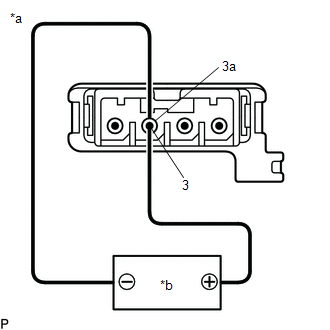
| (b) Current consumption check: (1) Measure the current consumption according to the value(s) in the table below. Standard Current:
NOTICE: Do not apply 6 V or more between terminals 3 and 3a. HINT: If a stable power supply is not available, connect 4 nickel-metal hydride batteries (1.2 V each) or equivalent in series. |
|
2. INSPECT NAVIGATION ANTENNA ASSEMBLY (w/ Manual (SOS) Switch)
(a) Check that the navigation antenna assembly cable is properly installed and does not have any sharp bends, pinching or loose connections.
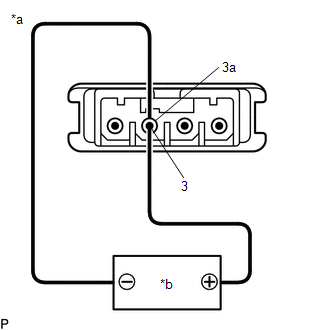
| (b) Current consumption check: (GPS) (1) Measure the current consumption according to the value(s) in the table below. Standard Current:
NOTICE: Do not apply 6 V or more between terminals 3 and 3a. HINT: If a stable power supply is not available, connect 4 nickel-metal hydride batteries (1.2 V each) or equivalent in series. |
|
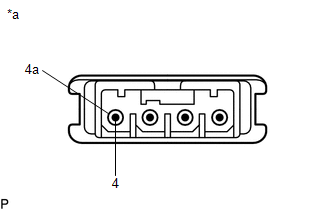
| (c) Resistance check: (Telephone Sub) (1) Measure the resistance according to the value(s) in the table below. Standard Resistance:
|
|
 Removal
REMOVAL CAUTION / NOTICE / HINT The necessary procedures (adjustment, calibration, initialization, or registration) that must be performed after parts are removed and installed, or replaced during nav ...
 Installation
INSTALLATION PROCEDURE 1. INSTALL NAVIGATION ANTENNA BRACKET 2. INSTALL NAVIGATION ANTENNA ASSEMBLY (a) Engage the 6 guides and 2 claws to install the navigation antenna assembly as shown in the illus ...
Other materials:
Lexus RX (RX 350L, RX450h) 2016-2026 Owners Manual > Lexus Display
Audio system: Playing an audio CD and
MP3/WMA/AAC discs
CD player operation
Insert a disc, press the "MEDIA" button or select "DISC" on the
"Source"
screen with a disc inserted to begin listening to a CD.
CD top screen
Pressing the "MEDIA" button displays the CD top screen from any screen of the
selected source.
■ Selecting a track/file
Press ...
Lexus RX (RX 350L, RX450h) 2016-2026 Repair Manual > Front Camera System: Internal Control Module Software Incompatibility Invalid / Incompatible Software Component (U030057)
DESCRIPTION The forward recognition camera receives the vehicle information from the ECM via CAN communication. DTC U030057 is stored when the vehicle information from the ECM and that stored in the forward recognition camera do not match. DTC No. Detection Item DTC Detection Condition Trou ...
Lexus RX (RX 350L, RX450h) 2016-{YEAR} Owners Manual
- For your information
- Pictorial index
- For safety and security
- Instrument cluster
- Operation of each component
- Driving
- Lexus Display Audio system
- Interior features
- Maintenance and care
- When trouble arises
- Vehicle specifications
- For owners
Lexus RX (RX 350L, RX450h) 2016-{YEAR} Repair Manual

0.0088