
Lexus RX (RX 350L, RX450h) 2016-2026 Repair Manual: Inspection
INSPECTION
PROCEDURE
1. INSPECT SPIDER BEARING
| (a) Check that the spider bearing rotates smoothly. |
|
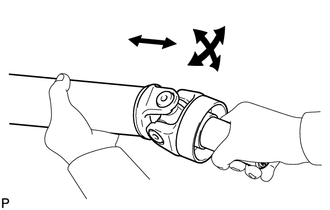
| (b) Check that there is no play in the spider bearing. If necessary, replace the propeller with center bearing shaft assembly. |
|
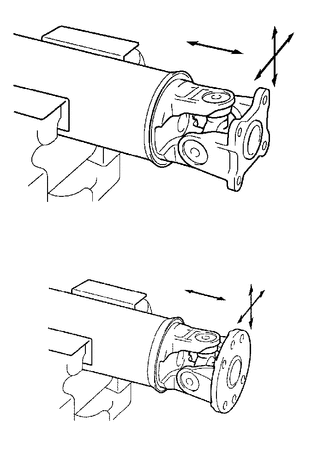
2. INSPECT INTERMEDIATE SHAFT ASSEMBLY
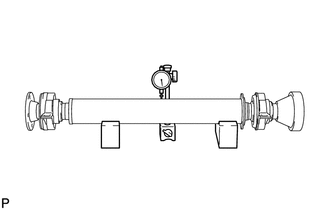
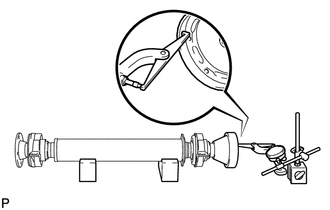
| (a) Using a dial indicator, measure the runout of the intermediate shaft assembly. Maximum Runout: 0.4 mm (0.0157 in.) NOTICE: The dial indicator must be set at a right angle to the center of the intermediate shaft assembly. If the shaft runout exceeds the maximum, replace the propeller with center bearing shaft assembly. |
|
| (b) Using a dial indicator, measure the runout of the universal joint flange (for front side). Maximum Runout: 0.1 mm (0.00394 in.) If the shaft runout exceeds the maximum, replace the propeller with center bearing shaft assembly. |
|
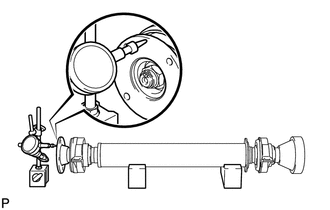
| (c) Using a dial indicator, measure the runout of the universal joint flange (for rear side). Maximum Runout: 0.1 mm (0.00394 in.) If the shaft runout exceeds the maximum, replace the propeller with center bearing shaft assembly. |
|
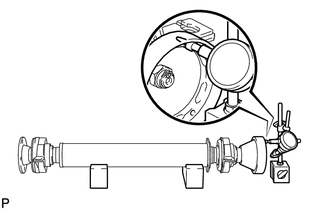
| (d) Using a dial indicator, measure the runout of the universal joint flange (for rear side). Maximum Runout: 0.1 mm (0.00394 in.) If the shaft runout exceeds the maximum, replace the propeller with center bearing shaft assembly. |
|
3. INSPECT PROPELLER SHAFT ASSEMBLY
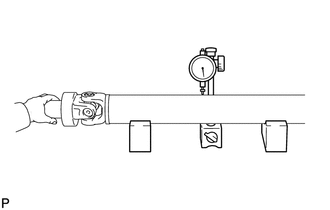
| (a) Using a dial indicator, measure the runout of the propeller shaft assembly. Maximum Runout: 0.4 mm (0.0157 in.) NOTICE: The dial indicator must be set at a right angle to the center of the propeller shaft assembly. If the shaft runout exceeds the maximum, replace the propeller with center bearing shaft assembly. |
|
4. INSPECT REAR PROPELLER SHAFT ASSEMBLY
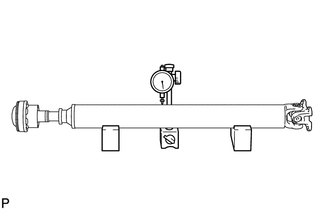
| (a) Using a dial indicator, measure the runout of the rear propeller shaft assembly. Maximum Runout: 0.4 mm (0.0157 in.) NOTICE: The dial indicator must be set at a right angle to the center of the rear propeller shaft assembly. If the shaft runout exceeds the maximum, replace the propeller with center bearing shaft assembly. |
|
5. INSPECT CENTER NO. 2 SUPPORT BEARING ASSEMBLY
| (a) Turn the center No. 2 support bearing assembly by hand. |
|
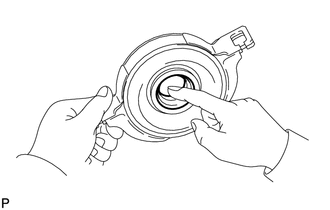
(b) Check that the center No. 2 support bearing assembly turns smoothly, and check that the seals are not cracked or damaged.
If the center No. 2 support bearing assembly is damaged or worn, or does not turn smoothly, replace it.
 Removal
REMOVAL PROCEDURE 1. REMOVE NO. 2 ENGINE UNDER COVER Click here 2. REMOVE FRONT FLOOR COVER LH Click here 3. REMOVE FRONT CENTER FLOOR COVER for TMC Made: Click here for TMMC Made: Click he ...
 Installation
INSTALLATION PROCEDURE 1. TEMPORARILY TIGHTEN PROPELLER WITH CENTER BEARING SHAFT ASSEMBLY (a) Remove SST from the transfer assembly. (b) Insert the propeller with center bearing shaft ...
Other materials:
Lexus RX (RX 350L, RX450h) 2016-2026 Repair Manual > Steering Gear: Removal
REMOVAL CAUTION / NOTICE / HINT The necessary procedures (adjustment, calibration, initialization, or registration) that must be performed after parts are removed and installed, or replaced during steering gear assembly removal/installation are shown below. Necessary Procedures After Parts Removed/I ...
Lexus RX (RX 350L, RX450h) 2016-2026 Repair Manual > Rear Power Seat Control System(for Second Row): Precaution
PRECAUTION POWER FOLDING SEAT FUNCTION HANDLING PRECAUTIONS NOTICE:
When a rear power seat is operating, make sure that the area around the seat is free of obstructions.
When a rear power seat is operating, be careful not to allow any part of your body or foreign objects to interfere with the s ...
Lexus RX (RX 350L, RX450h) 2016-{YEAR} Owners Manual
- For your information
- Pictorial index
- For safety and security
- Instrument cluster
- Operation of each component
- Driving
- Lexus Display Audio system
- Interior features
- Maintenance and care
- When trouble arises
- Vehicle specifications
- For owners
Lexus RX (RX 350L, RX450h) 2016-{YEAR} Repair Manual

0.0089